The Rebalancer is a core component of the Protocol and is crucial in achieving the best possible yield for Fleets. Operating as an AI-informed system, it is responsible for rebalancing and reallocating assets from lower performing ARKs to higher ones.
Rebalancing is implemented by Keeper AI Agents but is subject to strict constraints set within the FleetCommander and controlled via Governance. These constraints set the limits on what a Keeper Agent can do. Concretely, this might be restrictions on how much value can be moved during each rebalance or how frequently funds can be moved. Third-party actors are expected to produce timely reports on the Protocol's rebalance activities, using on-chain data. These reports will highlight any rebalance actions that may not align with the best interests of the Protocol, ensuring they are flagged and brought to the attention of governance.
Rebalancer mechanisms and AI Agents are intended, and expected, to be completely permissionless and open. However, at the Protocol's inception, rebalancing will be restricted to a whitelisted set of Keeper Agents approved by Governance and a limited set of advanced components. Once Governance is satisfied that rebalancing can be made permissionless then the whitelist can be removed.
Keepers
Keepers
Keepers perform off-chain monitoring and make rebalancing calls to optimize yield allocation across DeFi protocols. Our Keeper infrastructure is evolving towards a decentralized network of specialized AI agents working collaboratively to maximize returns while maintaining robust security guarantees that combines several innovative components:
AI Agents that analyze yield opportunities and propose rebalancing strategies
Safe multisig wallets as coordination mechanisms for consensus-driven execution
Zero-knowledge proofs for private strategy validation and frontrunning prevention
On-chain verification of performance metrics and constraint compliance
Initially, Keepers operate using a limited set of these components and are whitelisted to ensure system stability as we scale. Third parties who wish to become Keeper's should submit a request via Governance. Compensation for Keepers is also determined by Governance and effected by the TipJar contract.
All Keepers must operate within the parameters set by Governance at the Fleet Commander level, ensuring that ARKs offering the highest real-time APY receive optimal capital allocation while maintaining protocol security and efficiency.
This infrastructure will be rolled out in phases as we carefully test and validate each component, working towards our vision of a fully decentralized, intelligent capital allocation system in DeFi.
Basic Concepts
Find a short definition of each concept outlined and detailed further in the documentation.
Fleet: A set of contracts that manage user deposits and generate yield through various strategies.
Vault: The user-facing component of a Fleet where users deposit tokens to earn yield.
ARK: A contract that implements specific yield-generating strategies like lending or staking.
Buffer ARK: A specialized ARK that holds liquid assets for quick, low-cost withdrawals.
Fleet Commander: The central coordinator that manages deposits, withdrawals, and asset allocation across ARKs.
RAFT: A contract that harvests and auctions reward tokens, converting them back to the Fleet's deposit token.
Tips: 1% fee on Assets Under Management (AUM) distributed through share dilution.
TipJar: System for distributing protocol fees to designated recipients through configurable streams.
TipStreams: Individual recipient configurations in the TipJar with specific allocation rates and lock periods.
Forced Withdrawal: Mechanism allowing users to withdraw directly from ARKs when Buffer ARK lacks sufficient balance.
Rebalancing: Process of redistributing assets between ARKs to optimize yield and maintain buffer requirements.
Keepers: Authorized entities that can trigger rebalancing and other maintenance operations.
Share Price: Determined by total assets divided by total shares, with tips slightly diluting share value over time.
Governance: System controlling protocol parameters, ARK approvals, and fee distribution.
Admiral's Quarters: User interface contract enabling complex interactions with Fleets through batch operations.
Minimum Buffer Balance: Required minimum amount of assets in Buffer ARK to ensure withdrawal availability.
Deposit Cap: Maximum amount of assets a Fleet or ARK can accept.
Active ARKs: ARKs approved by governance for use in a Fleet.
Referral System: Optional mechanism for tracking user onboarding through referral codes.
Rewards: Additional tokens earned through ARK strategies and converted by RAFT.
Dutch Auctions: Mechanism used by RAFT to sell harvested rewards at optimal prices.
Effective Deposit Cap: Dynamic cap for ARKs based on Fleet TVL and configuration.
Voting Power: Governance rights determined by share ownership and delegation patterns.
Decay Function: System reducing voting power over time to encourage active governance.
Products
Overview
Introduction
Summer.fi is an app designed to simplify and enhance users' interactions with lending, borrowing, and yield generation. The ecosystem consists of separate entities and contributors who work together to drive its growth and adoption.
To better understand Summer.fi, it’s important to distinguish between the different areas and components of the platform. These distinctions clarify how the protocol operates, evolves, and interacts with its community and governance.
What is Summer.fi?
Summer.fi is a unified frontend offering two distinct yet complementary products:
• Lazy Summer Protocol: A hands-free, passive lending protocol for effortless yield optimization.
• Summer.fi Pro: An advanced lending, borrowing, and earning app for more experienced DeFi users.
These apps create a comprehensive ecosystem that adapts to your goals and risk appetite.
Lazy Summer Protocol
For those who prefer to “set it and forget it,” Lazy Summer Protocol offers:
• Lazy Vaults: Tailored portfolios for diversified, risk-adjusted yields.
• Auto-Rebalancing: Ensures optimal returns without manual intervention.
• Simplicity: A user-friendly interface that makes DeFi accessible to everyone.
To participate in governance decisions for the Summer Protocol, visit and - These platforms provide a comprehensive list of all closed, ongoing, and upcoming proposals for the Summer DAO. By voting, $SUMR holders can directly influence the protocol’s future.
Voting Power
Voting power in the Summer.fi DAO is determined by the amount of $SUMR tokens you hold or have been delegated. The governance system ensures a fair voting mechanism, giving more influence to those holding or representing a larger share of $SUMR.
To calculate voting power, the system tracks $SUMR token ownership and delegation at the time of the snapshot for each proposal and applies the Voting Power Decay. Learn more in:
Key Participants in Governance
Delegates: Delegates are key players in Lazy Summer Governance, holding voting power through self-delegation or from others in the community who trust them with their $SUMR tokens. Their role is crucial, and they’re rewarded for their efforts with $SUMR tokens.
Delegators: Delegators are $SUMR token holders who choose to delegate their voting power to a trusted individual, empowering delegates to represent their interests in governance decisions, they also earn $SUMR rewards and need to be active in checking their Delegates Voting Power.
Validation of Proposals
For a proposal to pass, it must reach a quorum. The quorum for governance proposals is set at 2% of the total supply, which is 2M $SUMR tokens.
The voting period for general proposals lasts 4 days, followed by a 48-hour timelock to finalize the decision and implement changes. While there is no mandatory waiting period before initiating a vote, proposers are strongly encouraged to discuss their ideas on the Summer Governance Forum before submitting an official proposal.
For more details on Summer Improvement Proposals (SIPs) please refer to the forum:
Delegation
Delegation allows you to assign your voting power to another member of the Summer community, referred to as a “delegate.” Delegates are responsible for actively participating in governance on behalf of the token holders who trust them with their votes.
More info on:
$SUMR Token
The $SUMR token is the governance token for the Summer Protocol. Holders of $SUMR and delegators make up the Summer DAO, which oversees and governs the protocol. Governance operates on a weighted voting system, where the number of $SUMR tokens held determines voting power.
• Community (35%, 350M): The largest allocation ensures the community remains the driving force behind $SUMR, rewarding active participation and engagement. At deployment, approximately 8.5% of the total supply, is set aside for governance grants. However, it is ultimately the DAO's responsibility to determine how the entire community allocation is distributed, ensuring flexibility and alignment with the protocol's goals.
• Key Stakeholders and Strategic Partners (25%, 250M): These tokens are set aside to strengthen collaborations and build a resilient ecosystem through key partnerships.
• Core Contributors (20%, 200M): Dedicated to the developers, maintainers, and contributors who power the protocol’s evolution and innovation.
• Foundation (Development, Ecosystem Growth and Marketing) (20%, 200M): Reserved to fund ongoing development, expand the ecosystem, and drive long-term growth initiatives.
$SUMR token holders are at the heart of the protocol’s evolution, ensuring a decentralized, community-driven approach to governance.
Contract Address:
Audits
Summer.fi maintains robust security through regular smart contract audits by leading firms and an active bug bounty program on Immunefi. All audit reports are publicly available, providing full transparency into security findings and implemented improvements. Combining systematic audits and community-driven security monitoring through bug bounties creates a comprehensive defense against potential vulnerabilities.
The TipJar is a core component of the Summer Protocol that manages and distributes protocol fees to reward participants. Every vault in the protocol charges a 1% fee on Assets Under Management (AUM), which flows into the TipJar.
When users deposit assets into a vault, they receive shares representing their portion of the vault. As fees accumulate, the TipJar mints new shares that slightly dilute existing shareholders. For example, in a vault with $1,000 in assets and 1,000 shares, minting one new share for the TipJar would make each share worth approximately $0.999 instead of $1.
These fees are distributed to protocol participants through the TipJar, which can be configured to send rewards to different addresses based on governance decisions. The TipJar ensures transparent and automated fee distribution while maintaining the protocol's economic incentives.
The TipJar can be paused by protocol governance in emergency situations, and its distribution parameters can be adjusted to adapt to changing protocol needs.
Total Supply and Tip Accrual
function totalSupply() public view override(ERC20, IERC20) returns (uint256) {
    if (_isCollectingTip()) {
        return super.totalSupply();
    }
    uint256 _totalSupply = super.totalSupply();
    return _totalSupply + previewTip(tipJar(), _totalSupply);
}
This function manages the total supply accounting while considering tips. When the contract is collecting tips (_isCollectingTip()), it returns the raw total supply. Otherwise, it adds the pending tip amount to the total supply to provide an accurate representation of all shares.
Tip Collection
function tip() public whenNotPaused returns (uint256) {
    return _accrueTip(tipJar(), totalSupply());
}
Initiates the tip collection process when the contract isn't paused. It calculates and mints new shares to the TipJar based on the current tip rate and total supply.
Shake Function - Distribution
function shake(address fleetCommander_) external whenNotPaused {
    if (!IHarborCommand(harborCommand()).activeFleetCommanders(fleetCommander_)) {
        revert InvalidFleetCommanderAddress();
    }

    IFleetCommander fleetCommander = IFleetCommander(fleetCommander_);
    uint256 shares = fleetCommander.balanceOf(address(this));

    if (shares == 0) {
        emit TipJarShaken(address(fleetCommander), 0);
        return;
    }

    uint256 withdrawnAssets = fleetCommander.redeem(
        Constants.MAX_UINT256,
        address(this),
        address(this)
    );

    // Distribution continues with transfer of assets to recipients
The shake function is the core distribution mechanism. It:
Verifies the FleetCommander is active
Checks for available shares
Redeems all shares for underlying assets
Distributes the assets according to configured allocations
Batch Distribution
function shakeAll() public {
    address[] memory activeFleetCommanders = IHarborCommand(harborCommand())
        .getActiveFleetCommanders();
    _shakeMultiple(activeFleetCommanders);
}
Provides a convenience function to distribute rewards from all active FleetCommanders in a single transaction.
Borrow
Learn more about Summer.fi Borrow
Summer.fi Borrow is the main entry point for users to lend their funds and borrow others.
With an intuitive and world-class UX that’s constantly evolving to suit users needs, the process to borrow is seamless.
Benefits:
Extra liquidity: Users gain access to extra liquidity if they choose to borrow DAI; and since Dai is a stablecoin, this liquidity can be used for trading, spending, or saving; all use cases are available.
Multiple collaterals: Different collateral types, rates and ratios are suitable for multiple risk profiles.
Flexible repayment schedules: There are no repayment schedules, no minimum payments, and no credit history requirements. Users can repay at their own pace as long as their Vault is properly collateralized
Risks:
Users need to be properly collateralized to avoid liquidations. Liquidations are the forceful sale of collateral to cover the borrowed funds and carry a penalty. You can learn more about liquidations and how to assess your Vault risk by following the links.
Summer.fi UX and UI provide you with all the needed info and tools to feel safe when you open and manage a Vault. Try it now.
Protocols Available for Borrow
Tutorials and Guides
Rewards
The Summer Protocol rewards users who participate in governance through SummerToken delegation. Earn $SUMR tokens through two main mechanisms:
Passive Participation
Delegate your voting power through SummerToken to trusted representatives. The GovernanceRewardsManager tracks and distributes rewards based on delegation amount, duration, and decay factors.
Active Participation
Active participants who receive delegated voting power earn rewards from:
GovernanceRewardsManager base rewards
SummerRewardsRedeemer bonus rewards for qualified governance actions
GovernanceRewardsManager.sol
Core Functions:
function stake(uint256 amount) external
Stakes SummerToken for governance. Updates decay factors and tracks reward accrual.
function earned(address account, IERC20 rewardToken) public view returns (uint256)
Calculates earned rewards considering:
Delegation via SummerToken
Smoothed decay factor
Staking period
Reward distribution rate
function getRewardFor(address account, address rewardToken) external
uint256 public constant DECAY_SMOOTHING_FACTOR = DECAY_SMOOTHING_FACTOR_BASE / 5;
EMA calculation:
function _calculateSmoothedDecayFactor(address account) internal view returns (uint256)
Reward Issuances
Governance will periodically issue rewards to this contract on our Hub chain (Base) Rewards accrue on the basis of an amount that can be earned per token staked. The more people stake the more the available rewards are distributed among them.
Lazy Vaults (also called Fleets) are the primary user-facing component of the Summer Protocol. Each Lazy Vault represents a Fleet - a set of coordinated contracts that include a Fleet Commander, ARKs, and RAFT.
A Fleet exists for each deposit token type (DAI, USDC, ETH) and multiple Fleets may exist per token to accommodate different risk preferences. Every Fleet is supported by the RAFT contract which farms reward tokens and swaps farmed tokens to the underlying Fleet deposit token - boosting Fleet yields at no cost to the user.
At launch, Fleet ARKs support basic lending and staking positions. Over time, advanced ARKs will be introduced to Fleets (subject to governance approval). A concrete example would be an ARK that supports the underlying yield-looping stack that is already available on Summer.fi today.
Key Components
Fleet Commander
Controls asset allocation and manages user deposits/withdrawals. Issues shares to depositors representing their ownership of the vault's assets.
ARKs
Specialized contracts that implement yield strategies through lending, staking, and other DeFi mechanisms. Each Fleet has multiple ARKs plus a Buffer ARK holding token for quick withdrawals.
RAFT
Automatically harvests rewards from protocols, converts them to the vault's deposit token, and reinvests them to compound yields.
Costs and Fees
This is a clear summary of all costs and fees associated to our products and features.
Introduction
This article is meant to clarify all costs and fees associated with Summer.fi products and features.
Usage of basic protocol functions is completely free of charge.
When an action includes a swap, Summer.fi charges 0.2% of the swap amount.
When the trading happens within correlated assets, the fee is 0.2% of the net value charged annually.
Product
Swap action
No swap
Multiply
0.2%
Free
Automations
0.2%
Free
Borrow
0.2%
Free
Earn
~0.2% of net value yearly
Free
This means for example that WSTETH/ETH positions will only pay 0.2% annually. This applies to WSTETH/ETH, RETH/ETH and similar pairs, this also applies to SDAI/USDC.
For example, if you open a WSTETH/ETH AAVE Yield Multiple and keep the position open for 6 months you will pay 0.1% of the position value. This fee will be charged on exit.
Automations refer to any kind of automation supported in the app such as Stop-Loss, Auto-buy or Auto-sell or any other available automation.
Migration and Refinance work under the same rules, if there is no swap there won't be a fee charged.
Protocol fees
Each protocol supported in the app might charge a variable borrow rate or origination rates. The app will explain in detail the rate regarding the fee for each individual position, this fee doesn't go to Summer.fi
Network fees
Each supported network in the app will have its own gas fees that are variable and depend on market conditions and demand. For EVM networks supported in the app might charge a variable borrow rate or origination rates. Before confirming each transaction, you will be able to see the gas cost of the operation in the order confirmation screen. You will pay these fees.
When our system executes an automated transaction in your behalf, such as Stop-Loss, you will pay for the gas cost spent, and the automation system will be refunded from your position.
ARKs
ARKs are the protocol's mechanism for deploying assets into different yield-generating strategies.
Each ARK represents a specific investment strategy or position, like lending on a DeFi platform or staking tokens. ARKs work together in Fleets to generate yield for users who deposit into Lazy Vaults.
When you deposit funds into a Lazy Vault, your assets are handled by the FleetCommander, which distributes them across multiple ARKs based on current market conditions and yield opportunities. Each Fleet has a Buffer ARK that acts as an entry and exit point, keeping some funds readily available for withdrawals while the rest are deployed in yield-generating ARKs.
Core Functions
Board Operation
function board(uint256 amount, bytes calldata data) external
Deposits assets into the underlying protocol. The data parameter allows passing protocol-specific information needed for the deposit. Implementation varies by ARK type.
Disembark Operation
function disembark(uint256 amount, bytes calldata data) external
Withdraws assets from the underlying protocol. Like board, data parameter usage depends on the specific ARK implementation.
RAFT maximizes yield in the Lazy Summer Protocol by managing reward tokens generated by ARKs. When users deposit into a Fleet through a Vault, their assets are distributed across ARKs that generate yield. RAFT harvests these rewards, converts them through auctions into the Fleet's base asset, and returns them to increase overall returns.
Core Functions
RAFT operates automatically to:
Harvest rewards generated by ARKs
Convert rewards to base assets through Dutch auctions
Return converted assets to enhance vault yields
As a vault user, RAFT requires no direct interaction. The system works continuously to optimize returns on deposited assets.
Impact on Returns
When ARKs generate rewards in external tokens, RAFT ensures optimal conversion back to the base asset. Dutch auctions start at higher prices and decrease gradually, finding the market-clearing price while protecting value.
Yield Enhancement
Consider a DAI vault with $1000 deposited. The ARKs generate COMP and AAVE rewards. RAFT:
Collects these reward tokens automatically
Auctions them for DAI through Dutch auctions
Returns the DAI to increase vault value
Reflects gains in vault share price
Harvest Management
The harvest system tracks rewards per ARK and initiates auctions:
Auction System
Dutch auctions handle reward token conversion:
Asset Return
Converted assets return to ARKs through boarding:
Integration Points
RAFT connects with:
FleetCommander
Controls ARK deployment
Manages asset allocation
Sets permissions
ARKs
Generate rewards
Accept boarded assets
Provide harvest functions
Delegation
Delegation is a core feature of Summer Protocol that allows token holders to assign their voting power to other addresses while maintaining ownership of their tokens. This system includes innovative decay mechanics that encourage active participation in governance.
How Delegation Works
When you delegate your voting power, you maintain full ownership and control of your tokens while granting your voting rights to another address. The delegate can vote with the combined voting power, but cannot transfer or use your tokens in any other way.
Your voting power decays over time unless you actively participate in governance or delegate to active participants. The decay starts after a decay-free window (initially set between 30-365 days) and can follow either a linear or exponential pattern.
Important Delegation Rules
Delegation chains are limited to a maximum depth of 2 to maintain system efficiency. For example:
Valid: Alice → Bob → Charlie
Invalid: Alice → Bob → Charlie → David (voting power decays to 0)
The decay factor affects both your direct voting power and any voting power delegated to you. By being an active governance participant or delegating to one, you help maintain the voting power of your tokens.
Tips for Effective Delegation
Choose delegates who actively participate in governance to minimize decay. Monitor your voting power through the governance interface and consider updating your delegation if your current delegate becomes inactive.
Core Functions
The delegate function runs on the hub chain only and handles delegation setup:
Updates caller's decay factor via updateDecay modifier
Sets up decay tracking for new delegatees
Records delegation via parent ERC20Votes contract
getVotes calculates total voting power by:
Getting base voting power (tokens + staked + vesting)
Applying decay factor through delegation chain
Using _getDelegateTo to traverse delegation links
getDelegationChainLength tracks delegation depth:
Recursively follows delegation chain
Stops at MAX_DELEGATION_DEPTH (2)
Returns 0 for null/self-delegations
getDecayFactor manages decay calculations:
Follows delegation chain to proper decaying account
Returns WAD (1e18) during decay-free window
Applies decay math after window expires
This creates a system where voting power can flow through delegation while maintaining decay pressure for inactive accounts.
function _harvest(address ark, bytes calldata rewardData) internal returns (
    address[] memory harvestedTokens,
    uint256[] memory harvestedAmounts
) {
    (harvestedTokens, harvestedAmounts) = IArk(ark).harvest(rewardData);
    for (uint256 i = 0; i < harvestedTokens.length; i++) {
        obtainedTokens[ark][harvestedTokens[i]] += harvestedAmounts[i];
    }
}
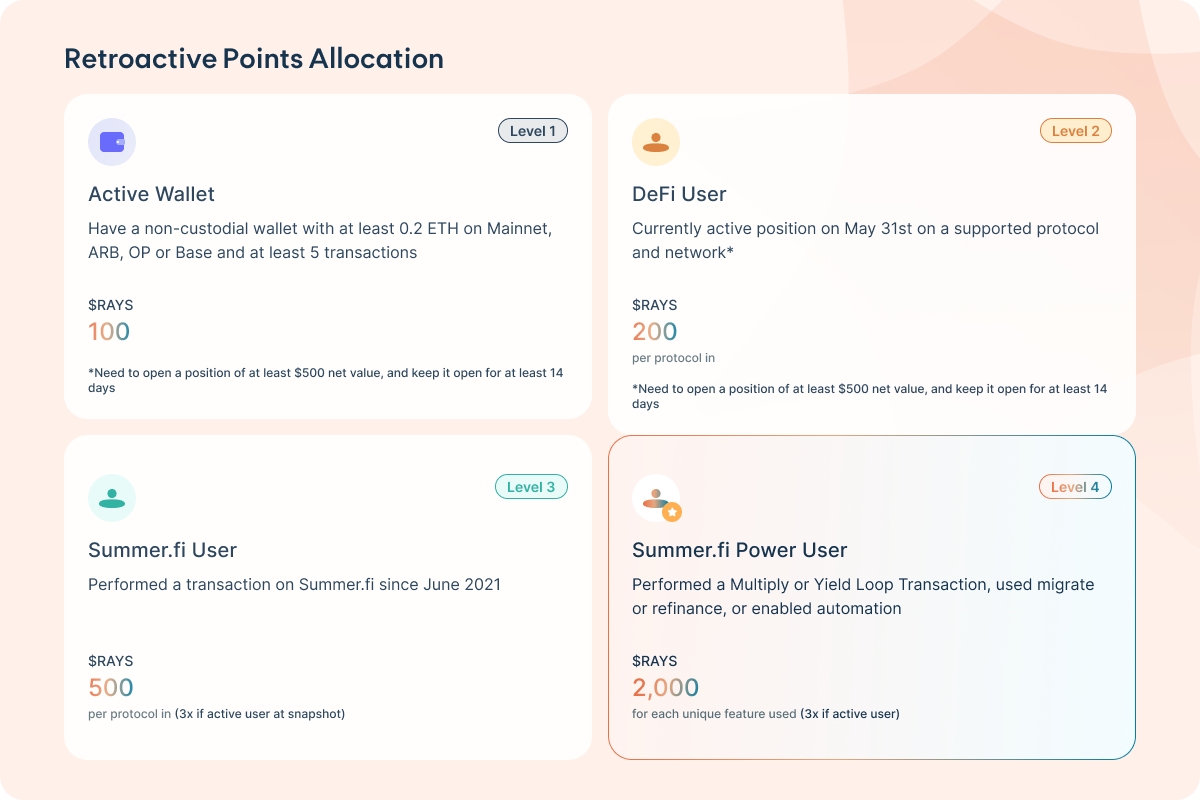
- What qualifies as an "Active Wallet" for Level 1?
An active wallet must have at least 0.2 ETH and a minimum of 5 transactions on Mainnet, ARB, OP, or Base.
- How many $RAYS can a DeFi User earn?
A DeFi User earns 200 $RAYS per supported protocol, provided the position of at least $500 net value is maintained for 14 days.
- What transactions are considered for a Summer.fi User under Level 3?
Any transaction made on Summer.fi since June 2021 qualifies.
- What features contribute to becoming a Summer.fi Power User?
Features like Multiply, Yield Loop Transactions, migration, refinance, or automation are considered.
- How is the reward for a Summer.fi Power User calculated?
The reward is 2,000 $RAYS for each unique feature used, and it is tripled if the user was active at the time of the snapshot.
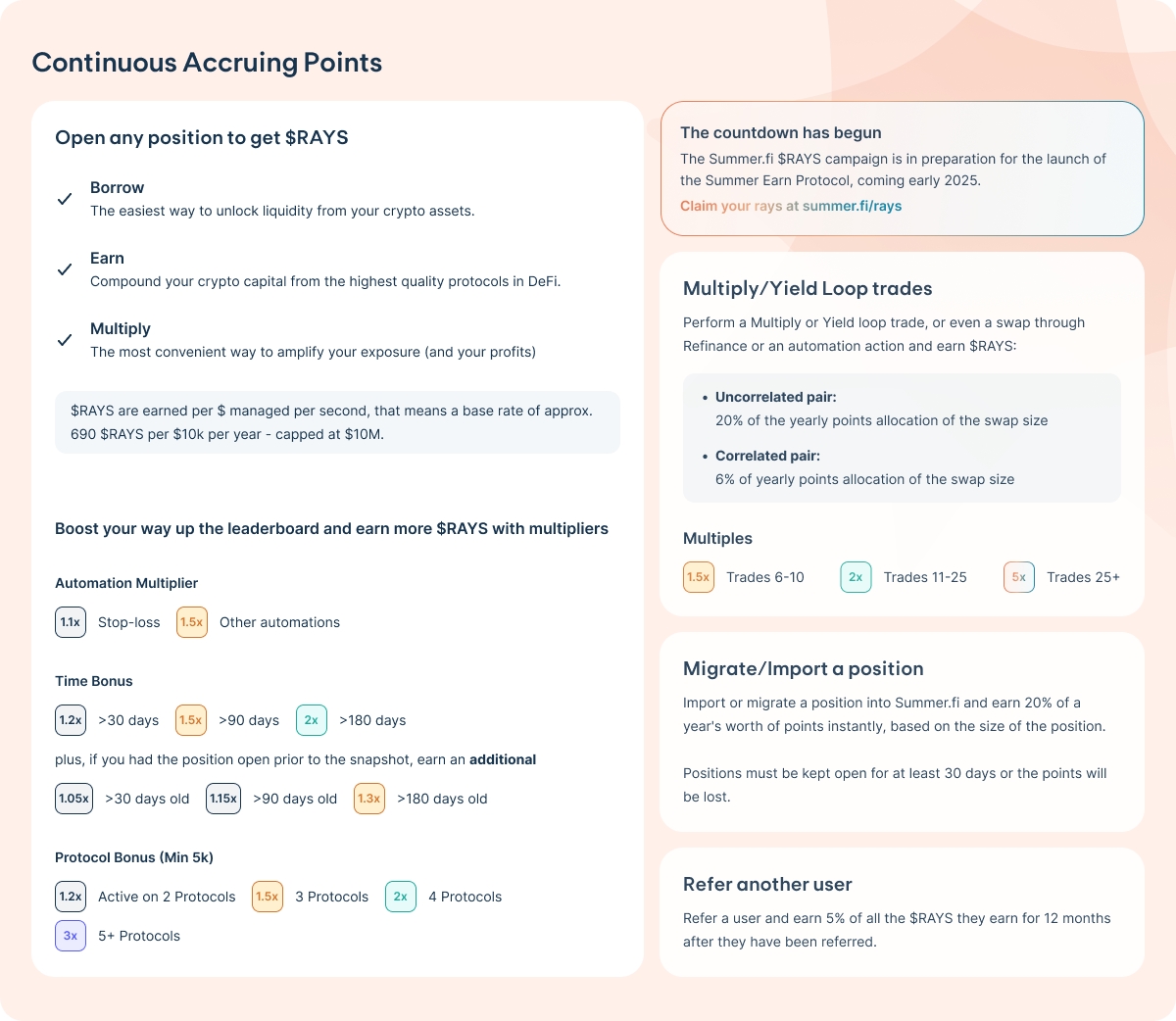
- What activities can open positions to earn $RAYS?
Activities include borrowing, earning, and multiplying crypto assets.
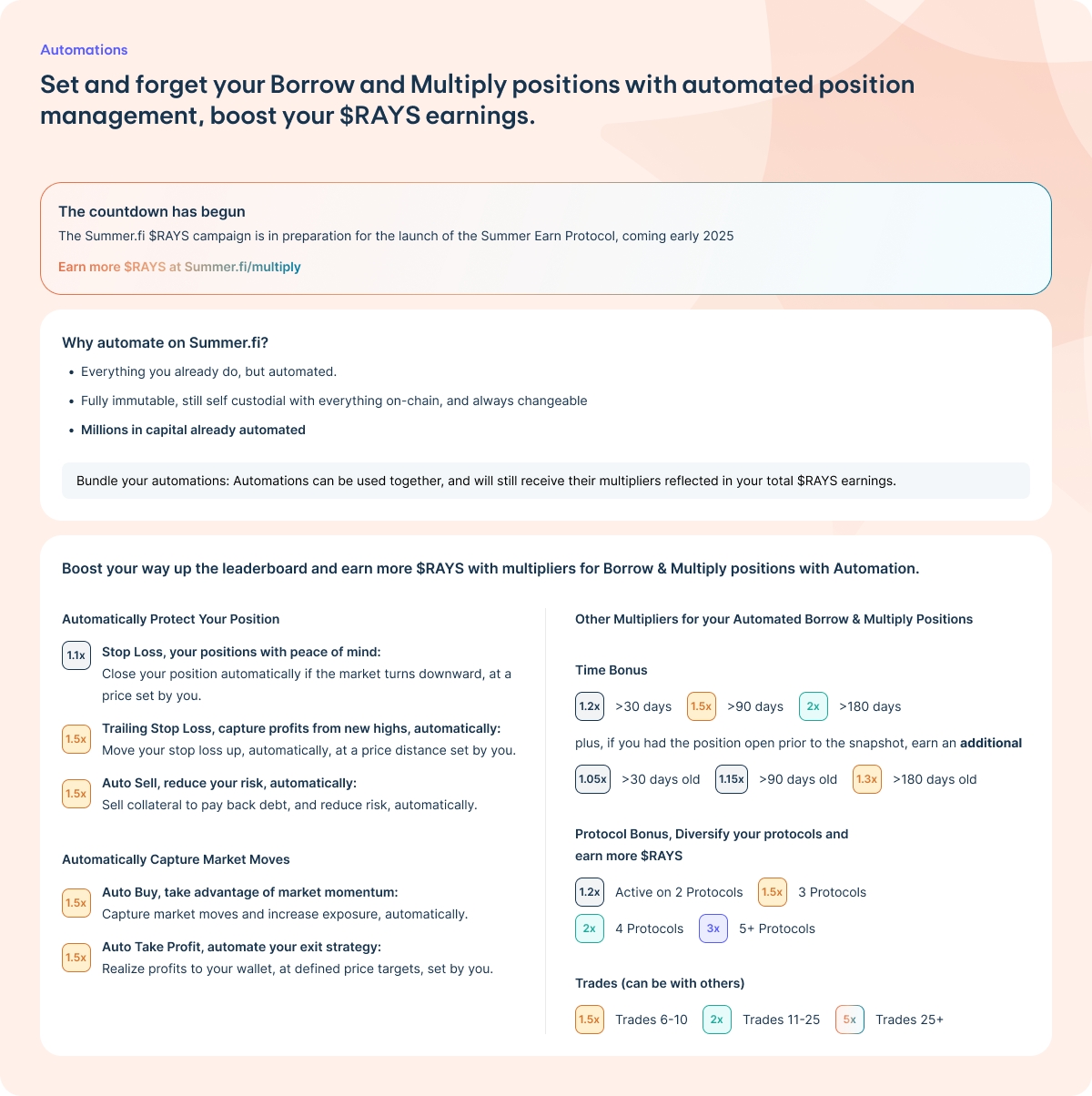
- What are the multipliers available for boosting leaderboard rankings?
Multipliers include automation (1.1x-1.5x), time bonuses (1.2x-2x), and protocol bonuses (1.2x-3x).
- How are $RAYS calculated for Multiply/Yield Loop trades?
Uncorrelated pairs yield 20% and correlated pairs 6% of the yearly points allocation of the swap size.
- What is the benefit of migrating or importing a position?
Importing or migrating a position grants 20% of a year’s points instantly, requiring a 30-day position hold.
- How does the referral system work?
Referring a user provides 5% of all the $RAYS they earn for 12 months after the referral.
- How do automations impact my $RAYS earnings?
Automations can boost $RAYS earnings by applying multipliers based on the type of automation and engagement duration.
Cross-Chain Governance
Cross-Chain Governance in the Summer Protocol
Overview
The Summer Protocol employs a cross-chain governance system, with the BASE network serving as the central authority. This model ensures a unified governance framework across multiple chains while maintaining security and simplicity. The governance structure is divided into two components: the Hub Chain (BASE) and Satellite Chains.
Hub Chain: BASE
BASE acts as the central hub for all governance-related activities within the protocol. It serves as the source of truth and ultimate authority for decision-making. Key responsibilities of BASE include:
• TimelockController: Governance actions are subject to a timelock, adding a layer of security and predictability to the process.
• Token Supply and Distribution: BASE manages the minting and allocation of $SUMR tokens across chains.
• Proposal Creation and Voting: All governance proposals are created and voted on exclusively through BASE, consolidating decision-making in a single location.
Satellite Chains
Satellite Chains operate as execute-only nodes within the governance system. Unlike BASE, these chains do not support proposal creation or voting. Their primary role is to execute governance decisions made on the hub chain. Characteristics of Satellite Chains include:
• Token Supply: They begin with zero $SUMR tokens, ensuring no governance capabilities at inception.
• Token Minting: Tokens are minted on Satellite Chains only via a secure “teleportation” mechanism from BASE.
• Governance Limitation: No direct proposal creation or voting is possible, reinforcing BASE’s role as the central authority.
Cross-Chain Communication
To enable seamless governance across chains, the Summer Protocol relies on LayerZero for secure and efficient cross-chain messaging. This infrastructure ensures that messages and commands sent between BASE and Satellite Chains are reliable and tamper-proof.
Governance Workflow
The flow of a governance proposal within the Summer Protocol is outlined below:
Process Explanation
Proposal Creation: A governance proposal is initiated on the Hub (BASE).
Voting Delay: A specified delay period passes before voting begins, allowing participants to review the proposal.
Voting Begins: $SUMR holders vote on the proposal within the designated period.
Voting Period Expires: After the voting period ends, the results are evaluated to determine if the proposal passed.
Proposal Queued: Approved proposals are queued in the Timelock Controller for a predefined period.
Execution on Hub: The proposal is executed on BASE, finalizing the decision at the hub level.
Message Transmission: LayerZero securely transmits the execution message to the relevant Satellite Chain(s).
Reception by Satellite: The SummerGovernor on the Satellite Chain receives the message and processes the decision.
Execution on Satellite: The Satellite Chain executes the proposal, completing the cross-chain governance cycle.
Tip Streams
Tip streams are a mechanism designed to distribute fees among specific entities within a vault. These entities share a portion of the fees based on predefined rules. This process involves minting additional shares as tips, which slightly dilutes the overall value of existing shares. To keep the system fair and sustainable, the yield generated by the vault must outpace the fees distributed. For context, we charge a fee of 1% of the Assets Under Management (AUM), which forms the basis of the tips distributed.
How Tip Streams Work
In any vault, the fee is set at the vault level rather than individually for entities. Tip streams define how this fee is divided among those entitled to a share of the tips. A key part of the process is setting the tip rate, which determines the proportion of the fee that will be distributed as tips. These tips are collected in a central pool known as the TipJar.
When tips are distributed, they are not taken directly from the vault’s assets. Instead, additional shares are minted to represent the tips. These newly minted shares are added to the TipJar. This increases the total number of shares in the vault, slightly reducing the value of each share since the same amount of assets is now split among a larger number of shares.
The 1% AUM fee ensures a steady and predictable source for tip distribution. This percentage is applied to the total assets managed by the vault, making the system straightforward and easy to calculate.
Note: The Ethereum Mainnet $ETH vault charges a 0.3% AUM fees, instead of the 1% for stablecoin vaults.
function getTotalAllocation() public view returns (Percentage total) {
    total = toPercentage(0);
    for (uint256 i = 0; i < tipStreamRecipients.length; i++) {
        total = total + tipStreams[tipStreamRecipients[i]].allocation;
    }
}
The contract uses the OpenZeppelin SafeERC20 library for safe token transfers and includes comprehensive error handling for invalid operations.
Buffer ARK
The Buffer ARK is a specialized holding contract in the Lazy Summer Protocol that manages deposits and withdrawals. It maintains a portion of Fleet assets in an undeployed state for efficient withdrawals.
Functionality
The Buffer ARK holds incoming deposits until they are allocated to yield-generating strategies. It maintains a minimum balance relative to the Fleet's total value locked (TVL) to facilitate efficient withdrawals, particularly beneficial for smaller transactions.
Withdrawal Methods
Standard Withdrawal
Executes from Buffer ARK balance
Lower gas consumption
Efficient for most transaction sizes
Force Withdrawal
Activates when Buffer ARK balance is insufficient
Withdraws directly from yield-generating ARKs
Higher gas consumption
Necessary for large withdrawals
The Buffer ARK contract (BufferArk.sol) inherits from the base Ark contract and implement specialized buffer functionality:
The Buffer ARK inherits access control from the base Ark contract:
Only Fleet Commander can initiate withdrawals
Only authorized addresses can board assets
RAFT contract controls harvest operations
Dutch Auctions
Dutch auctions in the Lazy Summer Protocol facilitate efficient reward token sales. When ARKs harvest rewards, RAFT automatically auctions these tokens using a Dutch auction mechanism where prices decline over time until meeting a buyer or reaching the end price.
The auction process is fully automated:
ARK harvests rewards
RAFT initiates auction
Price declines according to chosen curve
Tokens are purchased or auction concludes
Proceeds are converted to vault tokens to enhance yields
function harvestAndStartAuction(
    address ark,
    bytes calldata rewardData
) external {
    (address[] memory harvestedTokens, ) = _harvest(ark, rewardData);

    for (uint256 i = 0; i < harvestedTokens.length; i++) {
        _startAuction(ark, harvestedTokens[i]);
    }
}
Price Decay Functions
Two decay functions are available:
// Linear decay
function linearDecay(
    uint256 initialValue,
    uint256 decayRatePerSecond,
    uint256 decayTimeInSeconds
) internal pure returns (uint256)

// Exponential decay
function exponentialDecay(
    uint256 initialValue,
    uint256 decayRatePerSecond,
    uint256 decayTimeInSeconds
) internal pure returns (uint256)
The chosen decay function determines how price decreases over the auction duration.
Automation
We aim to provide the best and most trusted entry point to deploy your capital. As such, we are constantly developing new tools to help you manage your positions and protect your assets.
With automation, you can automate critical functions related to the management of your position.
Please Note: Automation isn't guaranteed to work 100% of the time.
Several factors can relate to its success. These include liquidity, volatility, and gas.
We currently have 6 Automation strategies available, not all the strategies work with all supported protocols. Please check which is available if you intend to use in on your position.
Earn
Summer.fi Earn products are curated DeFi-products that easily put your deposits in a position to earn a yield.
Summer.fi Earn is a full self-custody solution for entering and exiting yield positions so you will always stay in control of your funds.
Increase the yield received from StETH
Upon opening a position, a flash loan for Dai is taken from Maker and deposited into the Aave Protocol. Then ETH is borrowed until it reaches the desired multiple level. Next, the loaned ETH as well as the user’s initial deposit is exchanged to StETH via 1Inch. The return comes first from the ETH staking yield provided by StETH. That yield is multiplied by increasing exposure to StETH by borrowing ETH.
Learn more about Aave V2 here. For the more efficient Aave V3 here.
Earn passive income with Dai Savings Rate (DSR)
The DSR is a special module in the MakerDAO smart contract system that allows DAI holders to receive a share of the revenue earned by MakerDAO. This share was recently voted to be set to 3.49% APY.
There are some differences between borrow and Multiply vaults.
Summer Multiply provides a set of new features on top of Summer Borrow. When you use Summer Multiply you get a new dedicated interface for a Multiply position, showing you Buying Power, Net Value, Multiple number and more information in the comparison screen. This information is only applicable in a Multiply position and will help you to better manage your position.
With a multiply Vault you get the ability to perform multiply actions, which use flashloans to make the trades, deposits and withdrawals of the extra collateral all in one transaction. These multiply actions have a fee of 0.2% of the size of the trade that takes place in each transaction. If a transaction is a Multiply action the fee will be clearly shown in the order summary screen.
Under the hood Multiply and Borrow are the same vaults or positions, so you can use your Multiply position to deposit, borrow and generate Dai, or any other collateral. These actions are available under the “Other Actions” tab, and they are free as always.
Just note: a different wording is used when it is connected to Multiply - "Deposit Dai" for instance is the same as "payback". "Withdraw Dai" is "generate Dai".
Multiply Vaults also enjoy a feature that allows you to close your positions instantly to either collateral or the borrowed asset, without the need for any DAI or collateral in your wallet. This Multiply actions will use a flashloan and sell all collateral needed to payback all outstanding debt. If you choose to close to Dai all collateral will be sold and Dai will be sent to the wallet. Otherwise you will keep the remaining collateral after paying all outstanding debt.
Now you know you can enjoy a more complete set of features when using Multiply to manage your Vaults.
sDAI
What's sDAI?
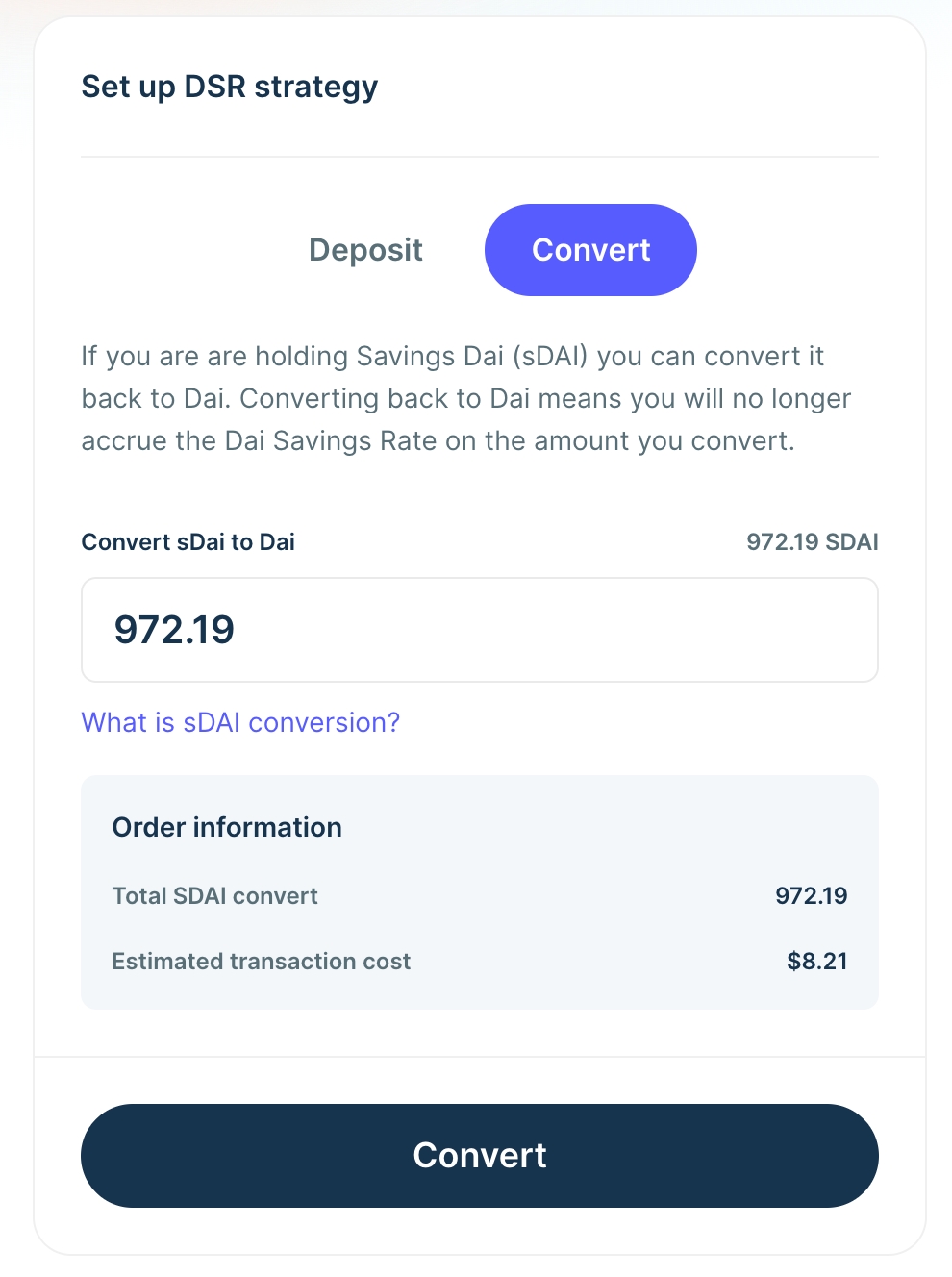
Savings DAI (sDAI) is a yield-bearing token representing DAI deposited in Maker's DAI Saving Rate (DSR) module. sDAI is connected to the DAI Savings Rate Module, which automatically accrues the DAI savings rate yield set by Maker governance.
When depositing into the DSR through Summer.fi you can choose to mint sDAI, this will then be available in your wallet to use as you please. One example where you can use the sDAI token is with Ajna to borrow USDC against it, which you can try here.
For example:
You deposit 10,000 DAI into the DSR Product and opt-in to minting sDAI. Once your deposit transaction is successfully submitted, you will receive the equivalent of sDAI at the current price.
To illustrate, let's assume sDAI price is 1.03 DAI. When you deposit 10,000 DAI you will get 9,700 sDAI. sDAI will accrue interest and constantly accumulate; this means that sDAI's value effectively always increases relative to DAI. After some time, when sDAI price reaches 1.05 DAI, for example, you can convert your 9,700 sDAI to 10,185 DAI.
You can find the current DAI Savings Rate on Summer.fi
More information on Maker Governance can be found here
Frequently Asked Questions
Summer Borrow is the main entry point for users to take advantage of DeFi. Through Summer.fi, users can generate (borrow) Dai, or other supported assets in any of the protocols.
For example, Dai has a stable price, soft pegged to the US dollar, and lives completely on the blockchain, making it borderless and available to anyone, anywhere. These and other blockchain benefits allow Dai to extend the power of traditional currency: it can be freely sent to others, used as payments for goods and services, or locked in a smart contract to earn savings.
Summer Borrow allows users to borrow Dai on Maker, or other assets in Aave and Ajna against any collateral supported like ETH, WBTC, and 20+ more. With an intuitive and world class UX that’s constantly evolving to suit users needs, the process to borrow Dai is seamless.
Benefits:
Extra liquidity: Users gain access to extra liquidity.
Multiple collaterals: Different collateral types, rates and collateral ratios are suitable for multiple risk profiles.
Flexible repayment schedules: There are no repayment schedules, no minimum payments, and no credit history requirements. Users can repay at their own pace as long as their Vault is properly collateralized
What are the differences between supported protocols for Summer.fi Borrow?
For Summer.fi Borrow, you can choose between Maker, AAVE, and Ajna. The most important differences with each protocol are:
Maker & Aave both use oracles. Maker has a 1-hour delay between oracle updates. This means that a position only becomes uncollateralized with a one-hour delay, allowing you more time to unwind your position. For Aave, liquidations are instantaneous, but this allows the protocol to have a lower penalty fee for liquidation. The liquidation penalty for each asset can be seen in the liquidation price tooltip. Maker uses its own oracle network to report prices, while Aave utilizes Chainlink services. Ajna does not use internal oracles.
Aave supports higher multiples and pays interest on the collateral deposited since it works with a single pool for lending and borrowing. This means that in cases where the protocol fails to deal with defaulting accounts properly and is left with bad debt, the risk is spread across all protocol users.
Aave has, in general, support for different tokens both as collateral and debt, allowing you to borrow different tokens.
Frequently Asked Questions
How are swaps done?
When a Multiply position is created, debt will be generated against collateral and swapped through 1inch protocol for more collateral in order to gain higher exposure to the supplied collateral. Thanks to the 1inch integration, users will get the best possible prices across all markets.
What is buying power?
The Buying Power specifies the maximum of debt tokens that you can draw to buy more collateral with, based on your position. It is using Multiply and going from the current loan to value to the maximum loan to value possible before liquidation.
What is net value?
The Net Value is calculated as the current value of the collateral in your poisition minus the current debt express in USD. This will not be exactly equal to the amount you will receive if you close your position. This is due to fees applied when swapping collateral to repay the debt and because the Net Value is calculated using the mid-market price, and you may suffer a larger price impact if you have a large position to close.
What is price impact?
Price impact is the spread between the mid-price and the execution price of a trade as the size of the trade grows with respect to available liquidity. If trade size is big and liquidity shallow, the difference between mid-market price and execution price will be high, and the user will be negatively impacted. Thanks to 1inch integration, Summer.fi users can trade with confidence that the best liquidity sources will be used to get the best price possible.
What is slippage?
Transactions sent to the network may take some time to confirm and because of this trades may execute at a different price than the one expected. Slippage refers to the difference you are willing to accept between the quoted price and the execution prices due to differences in market conditions during transaction confirmation.
What does the multiple number mean?
Multiply allow increased exposure to collateral price movements. As such, the multiple number refers to how much more the position is expected to increase or decrease in value with respect to movements of the collateral. If multiple is 3x owners will get 3 times as much price appreciation as if it was only holding their initial collateral.
UK Disclaimer
The summer.fi web-based user interface is provided as a tool for users to interact with third party DeFi protocols on their own initiative, without any endorsement or recommendation of cryptoasset trading activities. In doing so, Summer.fi is not recommending that users or potential users engage in cryptoasset trading activity, and users or potential users of the web-based user interface should not regard this website or its contents as involving any form of recommendation, invitation or inductement to deal in cryptoassets.
Risks of using our products
Please Note: Before using this product, it’s essential to understand the potential risks involved. Always exercise caution and evaluate your comfort level with these risks.
Risk Categories
1. Smart Contract Risks
• Potential vulnerabilities in the code could be exploited.
• Exploitation of code vulnerabilities may result in partial or total loss of funds, with no recourse for recovery.
• Risks from unaudited or newly deployed contracts.
• Interactions with external contracts that could inherit vulnerabilities.
2. Market Risks
• High volatility of underlying assets affecting position health.
• Liquidation risk due to rapid price declines or fluctuations.
• Collateral devaluation during market downturns.
3. Liquidity Risks
• Insufficient liquidity to withdraw or liquidate assets.
• Over-reliance on illiquid markets for collateral or borrowed assets.
4. Governance Risks
• Changes to protocol parameters that may impact user positions (e.g., interest rate changes).
• Exploitation of governance mechanisms leading to adverse outcomes.
5. Oracle Risks
• Dependency on accurate price feeds; potential manipulation or delays in updates.
• Malfunction or downtime of price oracle services.
6. Operational Risks
• Disruptions in the underlying infrastructure (e.g., node outages, network congestion).
• Risks tied to the user’s operational setup, such as wallet mismanagement or errors in execution.
7. Regulatory Risks
• Legal uncertainty around DeFi activities in various jurisdictions.
• Potential changes in regulatory frameworks impacting the ecosystem.
8. Tax Risks
• Uncertainties or non-compliance with tax regulations across jurisdictions.
• Risks of double taxation, conflicts between jurisdictions, and misclassification.
• Incorrect tax treatment could lead to penalties or financial losses.
Aave v2 stETH
StETH/ETH AAVE yield multiple is an Earn strategy that allows you to increase the yield received from StETH by increasing your exposure to it by borrowing ETH.
How does it work?
Upon opening a position, a flash loan for Dai is taken from Maker and deposited into the Aave V2 Protocol. Then ETH is borrowed until it reaches the desired multiple level. Next, the loaned ETH as well as the user’s initial deposit is exchanged to StETH via 1Inch. Following this process, the total StETH, minus fee, is deposited back into the Aave V2 Protocol where it then reaches its final position. Finally, the borrowed Dai is withdrawn from Aave and paid back to Maker and the Free Flash Loan is settled.
The process to exit these positions is quite similar, however users will now need to sell the StETH from the trade to pay back the ETH loan before withdrawing the remainder.
Where does the yield come from?
The return comes first from the ETH staking yield provided by StETH. That yield is multiplied by increasing exposure to StETH by borrowing ETH. An ongoing cost of the variable ETH borrowing rate in AAVE must be continually paid. This means that the strategy remains profitable as long as the borrowing cost of ETH is lower than the returns from StETH.
This Earn position uses 3 protocols and the power of Summer.fi smart contracts: All capital is deposited to AAVE v2 protocol and held there for the strategy to work. StETH represents ETH held by Lido, which in turn gives it to the node operators that perform the validator duties for Lido.
The Summer.fi fee is 0.20% of the amount swapped and is paid on setup and on each strategy adjustment. This strategy pays interest on the ETH borrowed from AAVE. This variable fee is accounted for in the net APY, but it changes continually as the market demands more or less ETH. Users need to take into account gas costs related to the Ethereum network, which vary with congestion and ETH price.
What are the risks?
Liquidation risk: If the price of stETH measured in ETH goes down, the position will be at risk of liquidation. This could happen for multiple reasons, for example, users selling their StETH for ETH to pursue other strategies, perceived or realized Lido execution risk, and lower general liquidity. If the price goes below the liquidation ratio, the position will be liquidated. To understand more about pricing of stETH in relation to ETH you can read more in our blog.
Lower than expected returns: The strategy assumes that the returns from ETH staking minus the Lido fee will be higher than the cost of borrowing ETH in AAVE allowing users to multiply this exposure. This assumption might not hold in all circumstances, and you should monitor the position to measure the profitability and desired risk. This is shown in app, allowing you to follow the health of your position.
Governance Risk: As AAVE is a DAO, their governance is in charge of adjusting the parameters. We will communicate the major changes, but if you want to be more informed, check AAVE Forum periodically to be updated on the decisions involving risk parameters for the assets. A proposal takes a total of 7 days to come online, which gives you time to adjust your position in case the change negatively affects your Earn strategy
Oracle Risk: Lending protocols like Aave rely on price oracles that convey asset prices external to the blockchain to the protocol. These are used for marking the value of outstanding loans and estimating which ones are in default. Manipulation of oracle price feeds or errors in reported prices can force the protocol to liquidate loans that are not in default, causing a loss of customer funds.
Systemic risk: Smart contract bugs, and fatal errors in any of the protocols being used such as AAVE, LIDO, and Summer.fi.
You can invite people to use our products, and both of you earn a percentage of the referred user's fees.
Currently, the referrer and the referred accounts get 5% of their Summer.fi generated fees.
At the moment, only Multiply Vault actions generate Summer.fi fees for a total of 0.2% of the swapped amount (see here for more information). This means that the amount rewarded for each "Refer a friend" program account is 0.01% of the swapped amount.
Once you join the "Refer a friend" program with your account, you will be able to generate a unique link that you can send to your friends or contacts.
By accepting our Terms of Service and agreeing with your referral, your referred account will start sharing fees with you.
Any account can refer an unlimited number of other accounts, but can only be referred once. All referrals are immutable, this means that you cannot unlink any of your referrals, and you cannot modify who referred your account.
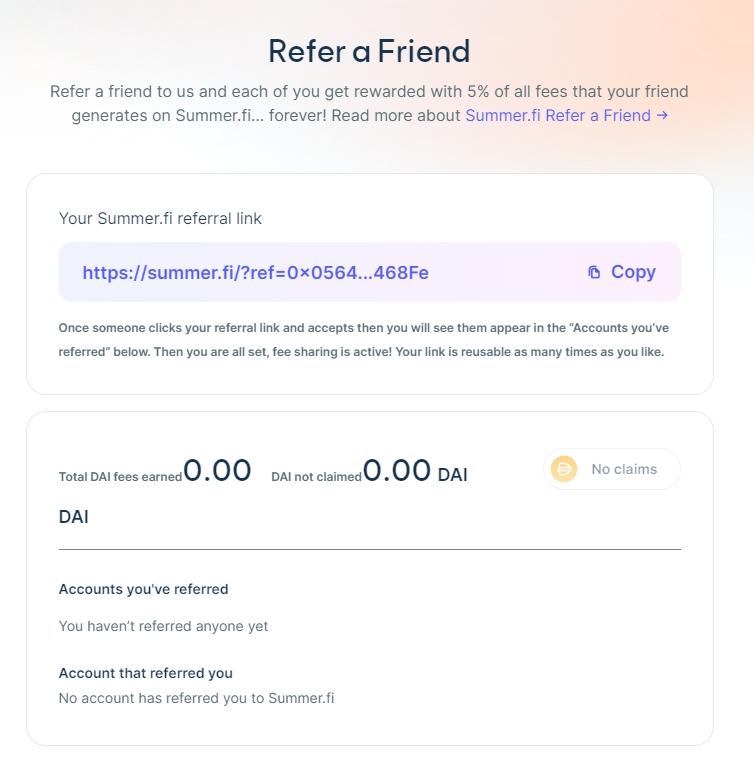
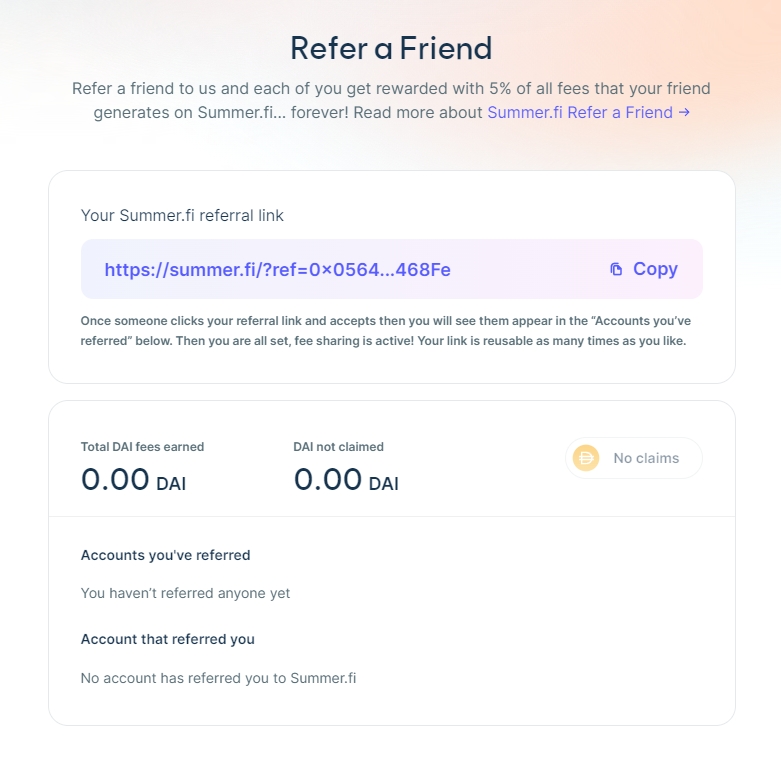
At any time, you can see all your referral information and accounts you referred to Summer.fi by visiting your personal "Refer a friend" control panel. As you can see in the screenshot below, you can also see how much Dai you generated in the program.
You can claim your rewards any time you like, but keep in mind that this involves a mainnet transaction, so it will incur in gas costs.
Auto-Buy
Setting up Auto-Buy for your Vault
Auto-Buy allows you to reduce your vault’s collateralization ratio by generating more debt which is swapped for collateral and deposited into your vault.
Auto-Buy allows you to reduce your vault’s collateralization ratio by generating more debt which is swapped for collateral and deposited into your vault.
This may be beneficial in a bull market where the value of your collateral is increasing. For example, you might want to keep your collateralization ratio below a certain amount. You can generate more debt and swap it for collateral whenever that trigger is hit. This gives you increased exposure to the collateral asset.
To configure your Auto-Buy, you have to determine:
Trigger Ratio
This is the collateralization ratio that, when hit, will trigger the execution of your Auto-Buy. The ratio is calculated with the next oracle price.
Target Ratio
This is the collateralization ratio that is going to be achieved by executing the Auto-Buy. For Auto-Buy, the Target Ratio is always lower than the Trigger Ratio.
Note: Auto-Buy will be eligible for execution if it can achieve the Target Ratio +/- 2%.
Max Buy Price
When you execute an Auto-Buy you generate debt to buy collateral, which is deposited into your vault. Here you are setting the maximum price that you are willing to pay for that collateral. Note that the price paid for the collateral is the current trading price on 1inch DEX, so it will very likely be different from the current and next oracle prices.
Max Gas Fee
Here you select the maximum gas fee you will spend each time your Auto-Buy executes. If the gas fee exceeds your max, the Auto-Buy will remain active but will not execute until the network gas fees reduce.
WARNING: This is a recursive strategy; the Auto-Buy will execute every time your trigger is hit. This means that the trigger remains in place even after the execution. If you do not wish to continue with the Auto-Buy execution, you must cancel it.
The video below shows a step-by-step tutorial for setting up an Auto-Buy strategy.
Welcome to Summer.fi Knowledge base, here you can find all about the products supported in the app.
What is Summer.fi?
Summer.fi (previously Oasis.app) was born as one of the first projects by MakerDAO, even before Single Collateral Dai, in 2016. As you can read , a lot has happened since these years.
Summer.fi, became a standalone entity after the full decentralization of Maker. This move was taken by our team, with the mission to build the most trusted app to deploy capital in DeFi.
Summer.fi today
Today, Summer.fi is more than just the front end to access Maker Protocol. It is on its path of providing the most trusted place to deploy your capital into DeFi, offering already three main products and advanced automation features.
When you decide to do one of the above actions, Summer.fi offers you different automation features. Stop-Loss allows you to sleep better without worrying about being liquidated and losing money; Auto-Buy & Auto-Sell, and constant multiple help you get the most out of your Vault.
Our curated experience allows you to get the best in class UX that clearly shows your position, the returns and the risk you are taking. We made a detailed knowledge base article to understand the strategy and take all the great feedback of the community to continue improving.
Products in Summer.fi
Here you can find all about Summer.fi products and offerings.
Summer.fi Lovin', DeFi Thrivin'!
-- Ancient on chain proverb
Supported Protocols
Supported Networks
Voting Power Decay
Explains how the Voting Power Decay works
Lazy Summer Protocol implements an advanced governance system where voting power dynamically adjusts based on participation. This system combines three key elements:
Voting decay that reduces influence over time
Delegation chains that allow power transfer
Rewards that incentivize active participation
How Voting Power Works
Your voting power in Summer Protocol comes from multiple sources:
Direct token holdings
Staked tokens in governance
Delegated voting power from other users
This total power is then modified by your decay factor. Starting at 100%, your voting power begins decaying after an initial grace period (60 days) with an annual decay of 10%.
Linear Decay:
Reduces voting power at a constant rate
Easier to predict and understand
Delegation System
You can delegate your voting power to other addresses, creating "delegation chains":
Maximum chain length: 2 levels
Example: Alice → Bob → Carol (valid)
Example: Alice → Bob → Carol → Dave (invalid, Dave gets 0 power)
Your rewards and voting power inherit the decay factor of your delegate. This means:
If you delegate to an active participant, you maintain higher power
If your delegate becomes inactive, your power decays
You can change delegation at any time
VotingDecayLibrary
The foundation of the decay system, managing state and calculations:
Key Functions:
Calculates current decay factor considering delegation chain
Follows delegation up to MAX_DELEGATION_DEPTH
Returns 0 for invalid/excessive delegations
Updates decay factor and creates checkpoint
Called before power-affecting operations
Triggers decay smoothing in rewards
VotingDecayMath
Handles precise calculations for decay:
Uses PRBMath for precise fixed-point math
Handles edge cases (zero values, excessive time)
Prevents overflow in calculations
GovernanceRewardsManager Integration
Manages reward distribution with decay:
Checks delegation status
Applies smoothed decay factor
Calculates proportional rewards
Implements exponential moving average
Smoothing factor: 0.2 (20%)
Updates on stake/unstake/claim
Decay Lifecycle
Active Period
An active account starts with a complete decay factor of 1.0 (100% voting power). A “decay-free window,” set at 60 days, protects accounts from immediate power reduction after their last activity. Performing any governance action resets the decay timer. Examples of such actions include proposing or voting on governance items, delegating tokens, canceling proposals, or executing them.
Decay Period
After the decay-free window expires, voting power declines according to the selected decay function (linear or exponential). The rate of decay is configurable, but starting at 10% yearly. This reduction continues until the account reaches a minimum threshold or participates in governance to reset the decay.
Delegation Effects
Delegation inherits the lowest decay factor in a delegation chain, up to a maximum depth of two levels. For instance:
• Alice (decay: 0.8) → Bob (decay: 0.9) → Carol (decay: 1.0)
Carol’s effective decay factor becomes 0.8 due to inheritance from Alice.
Recovery Options
Accounts can restore their full voting power in several ways:
1. Governance Participation
Performing any governance activity (e.g., proposing, voting) resets decay to 1.0 instantly. This option ensures active contributors retain maximum influence.
2. New Account Creation
Moving tokens to a new wallet address resets the decay factor. However, this approach involves higher gas costs, loss of delegation history, and the need to re-establish delegation relationships.
3. Delegation Changes
Delegating tokens to a more active account can improve decay status, as the delegate’s decay factor becomes the effective value. Note that delegation remains subject to the two-level depth limit.
How to refer a friend
Learn how to refer a friend
I want to refer my friends to Summer.fi
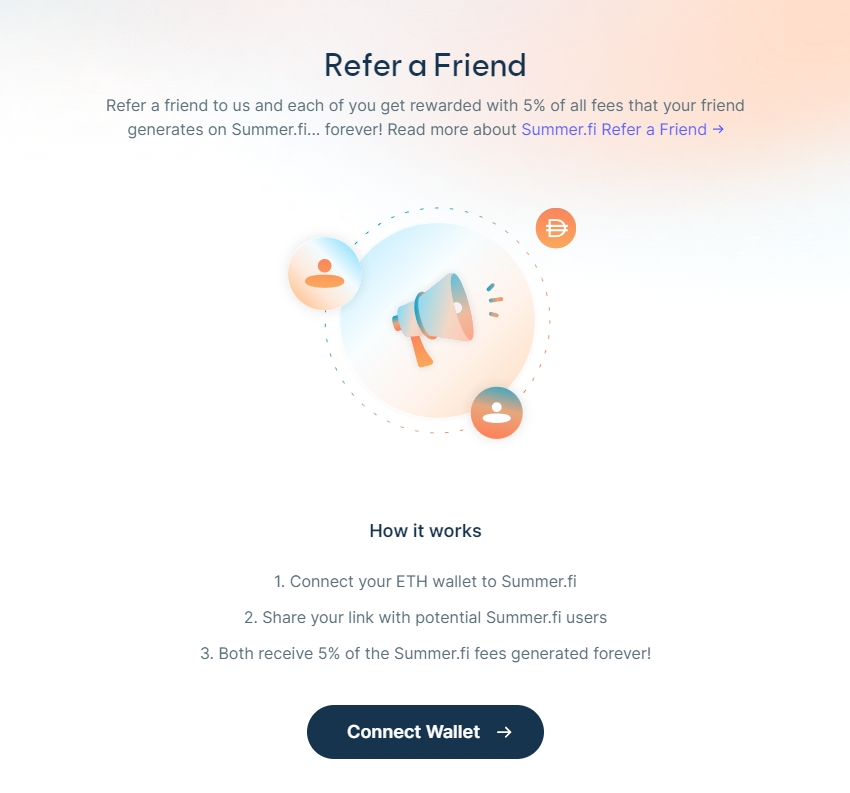
To refer your friends, visit Summer.fi, connect your wallet and visit the "Refer a Friend" control panel.
You will see your personal referral link (https://summer.fi/?ref=0x....), click the "Copy" button next to it. Now spread the word! Send the link to your friends, family members, tweet it, post it on instagram, make it a QR code and post it on a billboard, you name it. For each new account that accepts your referral, you will see them in your control panel, and you will start earning part of the fees they generate!
Once your referred accounts start transacting on Summer.fi, you will see your rewards in the control panel. All rewards are denominated in Dai and are not automatically deposited in your wallet, so you must claim them.
Referrals fees are claimed on Optimism, and you will earn fees for all our Premium products on all networks.
I was referred to Summer.fi
If someone sent you their referral link, once you visit the website using the given link, you will need to connect your wallet
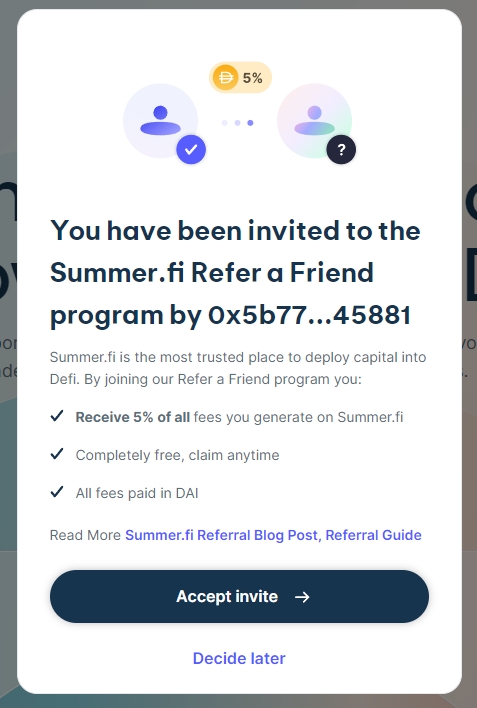
Once your wallet is connected, you will be asked to accept your friend’s referral. Keep in mind that your account can only be referred once.
Finally, once the invite is accepted, you can visit your Referral Dashboard to get your invite link and spread the word, or you can go to our homepage and start using our products. From now on, 10% of all fees you generate will be shared equally between your account and your referrer’s account.
How to setup your Stop-Loss
A step-by-step guide to setting Stop-Loss protection in your Vault
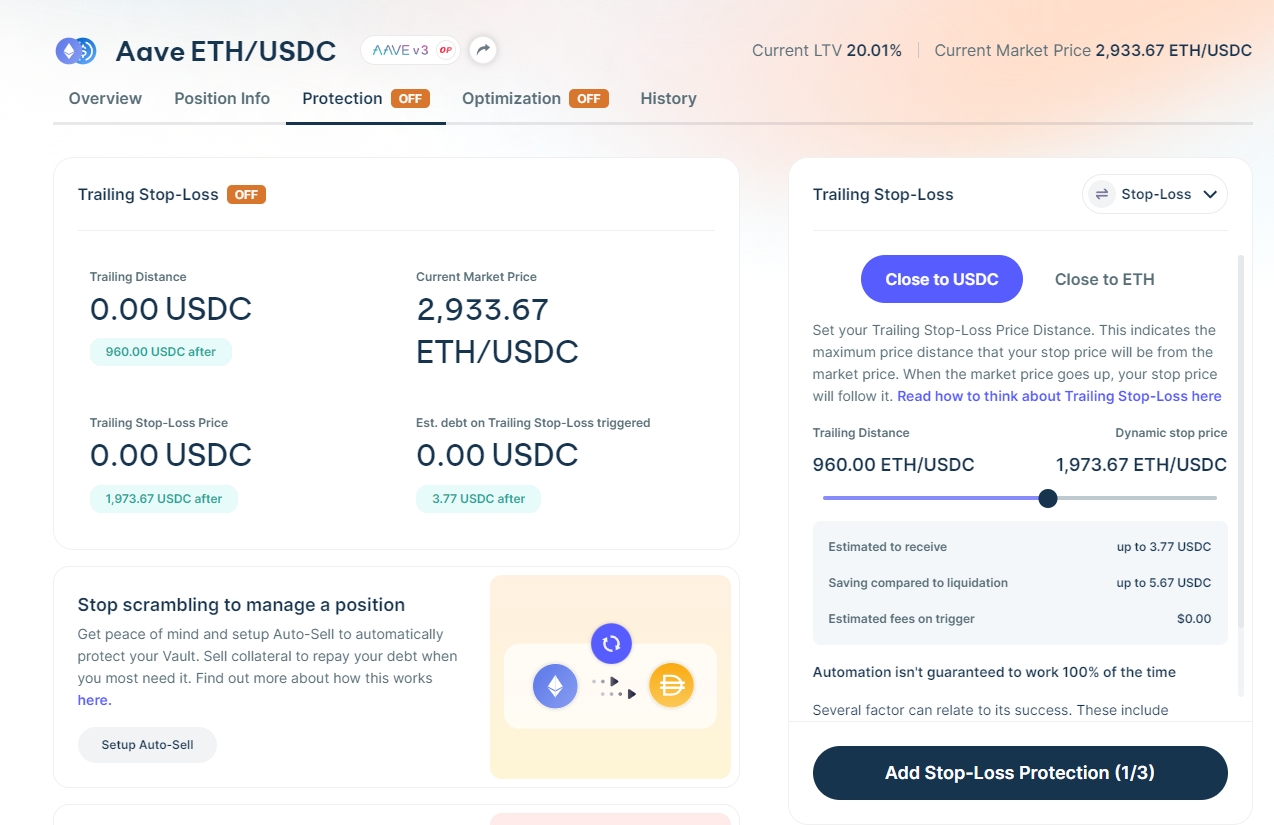
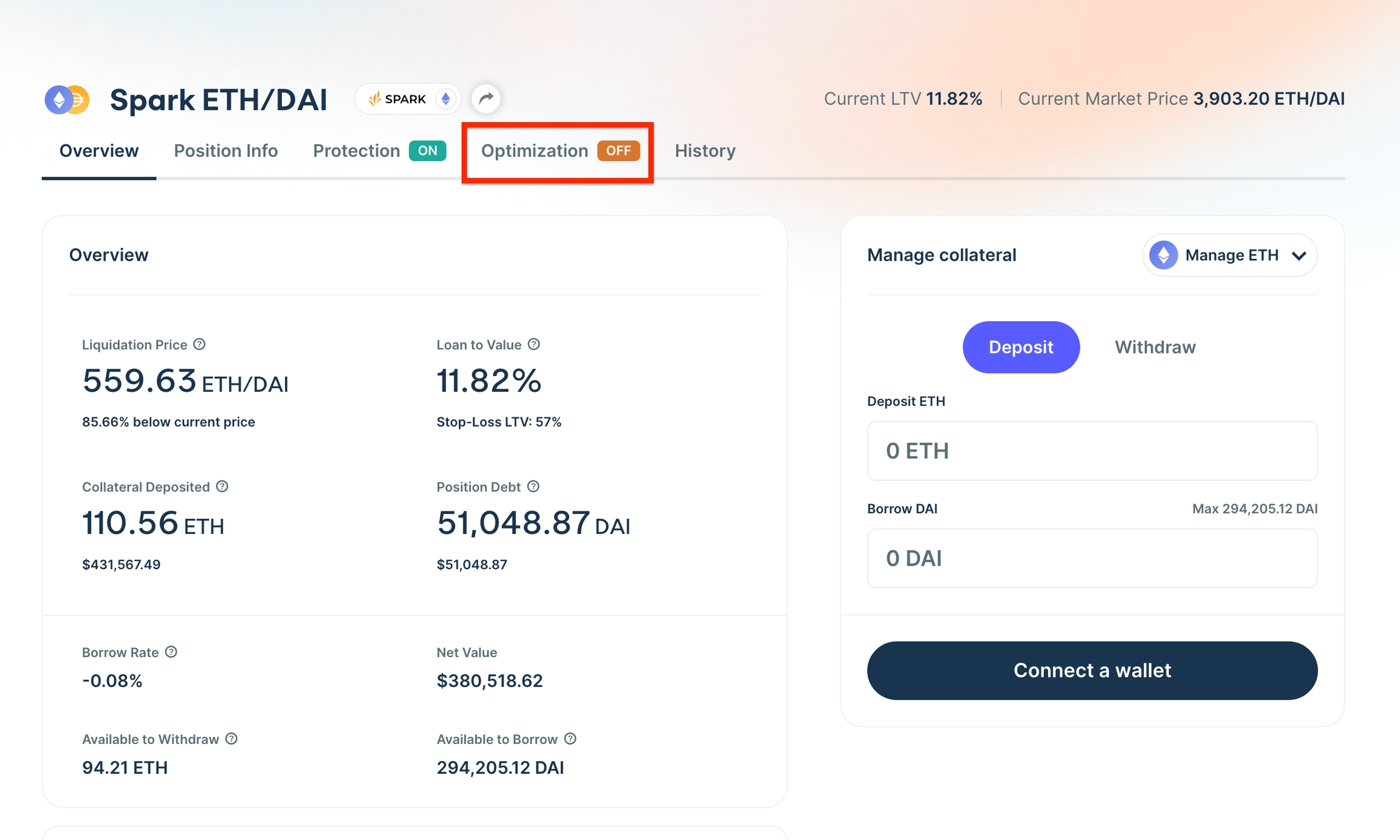
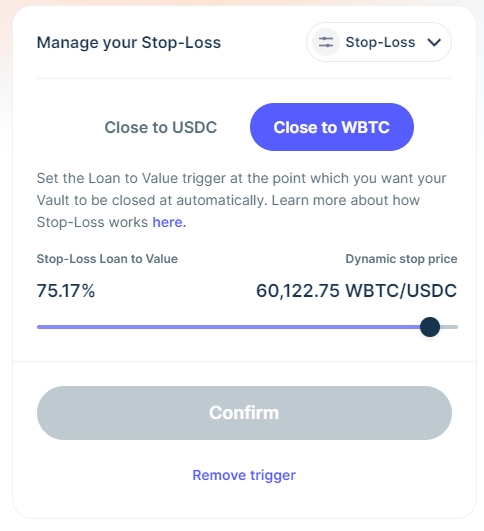
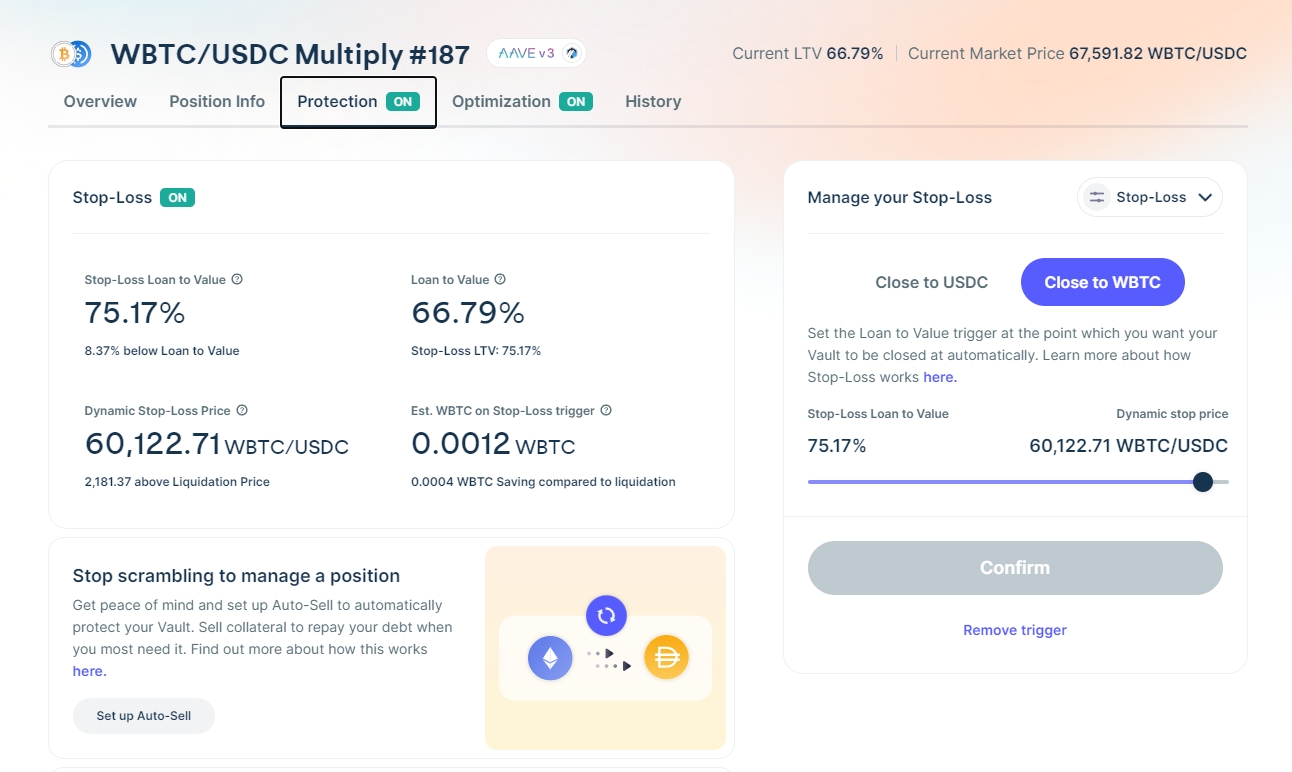
To enable the protection for your Vault, you first need to go to your Vault’s page, where you should see the navigation tabs, as shown in Figure 1:
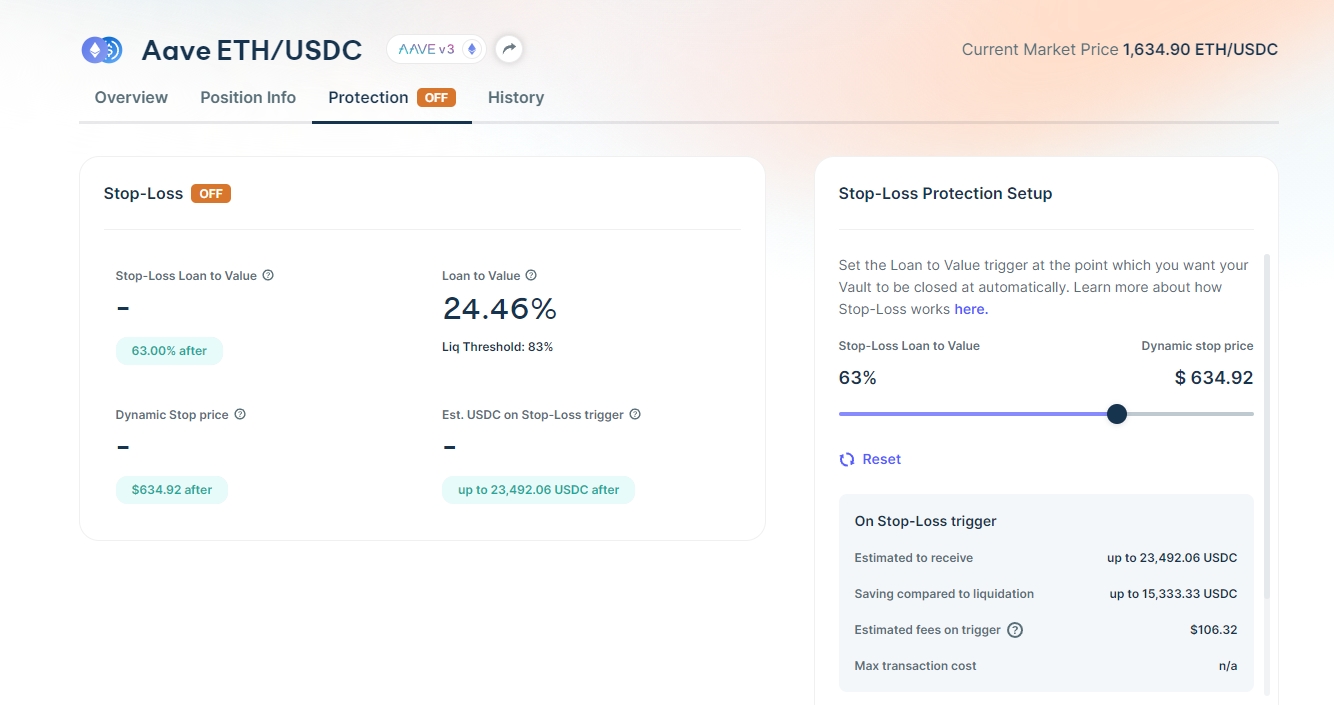
Clicking on the “Protection” tab will show you the Stop-Loss protection view, similar to Figure 2:
Here you can configure the Stop-Loss protection parameters from the slider and buttons located in the box shown at the right side of the screen. Ensure to read and understand the of setting up the protection and the inherent associated with the process.
When you settle on the protection parameters for your Vault, you must send a transaction to confirm your changes. You can do so by clicking the “Add Stop Loss” button, at the bottom of the box.
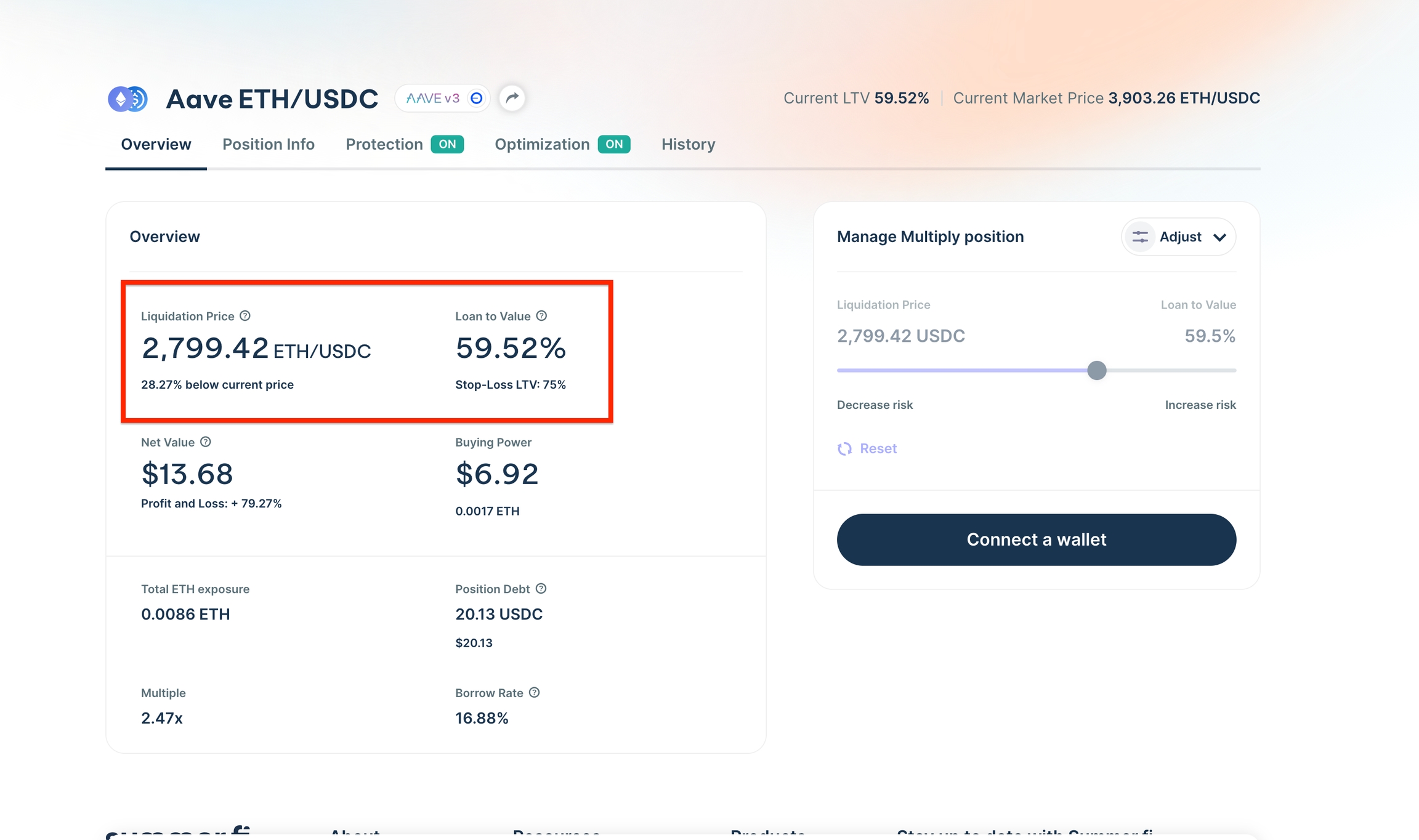
For Aave positions, you need to set up the Loan to Value, on Maker it's called Collateral Ratio
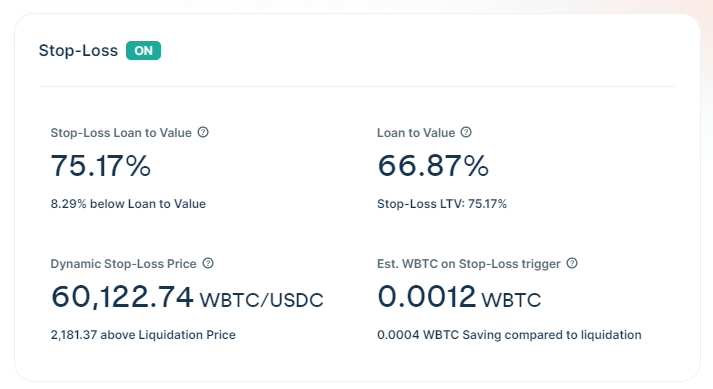
Once this transaction is confirmed, your Vault will be protected.
Watch a quick example of setting up the protection in the video below.
Dai Savings Rate (DSR)
Everything you need to know about the DSR
The DSR is a special module in the MakerDAO smart contract system that allows DAI holders to receive a share of the revenue earned by MakerDAO.
MakerDAO pays deposits in the Dai Saving Rate the shown APY continuously on every block. You can deposit as much as you want and withdraw at any moment. There are no lock-ups and no fees for using the Dai Savings Rate.
The yield comes from the profits generated by MakerDAO. Since Maker wants Dai to be used extensively in DeFi it has a mechanism for incentivizing users to hold Dai. Redistributing a part of the profits of MakerDAO for the Dai Savings Rate makes Dai grow.
How much does it cost?
This Earn Strategy is free of charge. All you have to pay are the gas fees for each transaction.
You don't need to manage this position; you will Earn more Dai at the rate shown continuously until MakerDAO adjusts the rate.
This is a long-term position; you can leave your Dai in the Dai Saving Rate contract for as long as you need or wish to. Even in cases where Maker reduces the Dai Savings Rate, your Dai will remain there until you withdraw it. You don't need to do anything if the Dai Savings Rate changes.
The rate could be adjusted up or down without prior notice; generally, rate adjustments will be announced in advance, and we will communicate the changes on all our channels, such as or .
Auto-Sell
Setting up Auto-Sell for your Vault
Auto-Sell allows you to increase your vault's collateralization ratio by automatically repaying your vault debt and de-risking your vault without closing it.
To configure your Auto-Sell, you have to determine:
Trigger Ratio
This is the collateralization ratio that, when hit, will trigger the execution of your Auto-Sell. The ratio is calculated with the next oracle price.
Target Ratio
This is the collateralization ratio that will be achieved by executing your Auto-Sell. For Auto-Sell, the Target Ratio is always higher than the Trigger Ratio.
Note: the Auto-Sell will be eligible for execution if it can achieve the Target Ratio +/- 2%.
Min. Sell Price
When you execute an Auto-Sell you are selling your collateral to repay the vault debt. You set the minimum collateral price you are willing to sell your collateral at when you execute your Auto-Sell. Note that the price paid for the collateral is the current trading price on 1inch DEX, so it will very likely be different from the current and next oracle prices.
Max Gas Fee
Here you select the maximum gas fee you will spend each time your Auto-Sell executes. If the gas fee exceeds your max, the Auto-Sell will remain active but will not execute until the network gas fees reduce.
WARNING: This is a recursive strategy; every time your trigger is hit, the Auto-Sell will execute. This means that the trigger remains in place even after the execution. If you do not wish to continue with the Auto-Sell execution, you must cancel it.
The minimum vault debt limits the Auto-Sell functionality. You can’t set up an Auto-Sell that will take you past your dust limit. Additionally, as this is a recursive strategy, if at some point of time the execution of Auto-Sell will leave your Vault’s debt below your minimum, it will not be executed and your Vault will be at risk of liquidation.
You can watch a step-by-step tutorial to set up an Auto-Sell strategy in the video below:
Take Profit
All you need to know about Take Profit and how to set it up.
Take profit is a strategy designed to automate your exit strategy. You set a Target Price for your collateral asset, and this is your Take Profit Trigger. It is constantly monitored and when the trigger is hit, Take Profit will automatically sell your collateral to Dai and close your Vault. Locking in your profits, even when you’re away from your keyboard.
Take Profit is currently available on Maker positions
How does Take Profit Work?
When you set up the Take profit on your Vault, you will be required to sign a transaction which gives permission for the Automation smart contract to allow vaults to be closed based on your selected parameters.
Once the transaction is confirmed on chain, keepers (scripts that run automatically) will monitor the next against your Take-Profit trigger. When the Take Profit trigger is hit, a keeper executes the trigger function by calling the Automation smart contract.
Take Profit automatically closes your Vault when the collateral asset reaches your “Target Price”. The automation smart contract sends a transaction to close your vault, which sequentially takes a flash loan, repays your Vault’s debt, unlocks and swaps your collateral, pays back the flash loan and sends any remaining funds (in collateral or DAI based on your selection) back to the vault owner’s wallet address.
How do I set up Take Profit?
To set up a Take Profit you need to have an existing Borrow or Multiply Vault on Summer.fi.
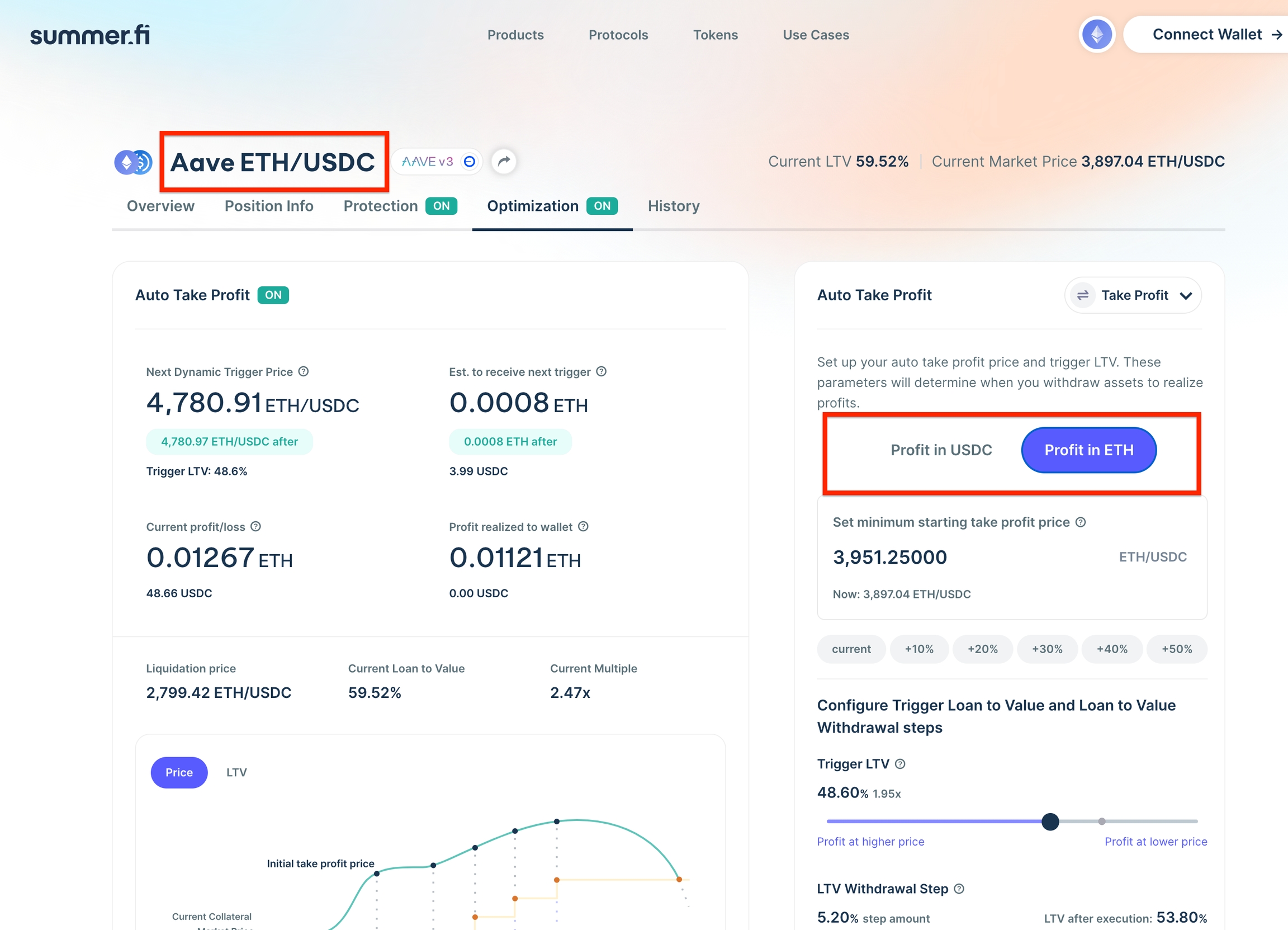
1. Go to the “Optimization” tab and select the Take Profit Banner
2. Select to take your profits in ETH or DAI.
3. Select your Target Collateral price Select “Set up Take Profit”
Why should I use Take Profit?
When you open any financial position, you take on some level of risk and hope for a reward. Risk and reward can sometimes cloud our judgement. Preventing us from taking actions that are objective and emotionless.
Therefore, it is sensible to have an exit strategy before entering any position. By doing this, you are setting your definition of success and failure up front, the decision on when to close your position is made before you take on any risk.
struct DecayState {
    mapping(address => DecayInfo) decayInfoByAccount;  // Per-account decay data
    uint40 decayFreeWindow;                           // Grace period before decay
    uint256 decayRatePerSecond;                      // Rate of power loss
    DecayFunction decayFunction;                     // Linear or Exponential
    uint40 originTimestamp;                         // Contract deployment time
    mapping(address => Checkpoints.Trace224) decayFactorCheckpoints; // Historical data
}

struct DecayInfo {
    uint256 decayFactor;              // Current decay multiplier
    uint40 lastUpdateTimestamp;       // Last activity timestamp
}
function exponentialDecay(
    uint256 initialValue,
    uint256 decayRatePerSecond,
    uint256 decayTimeInSeconds
) internal pure returns (uint256)
function earned(
    address account,
    IERC20 rewardToken
) public view returns (uint256)
function _updateSmoothedDecayFactor(address account) internal
Multiply
Increase or decrease the exposure to your collateral asset in one transaction.
Summer.fi Multiply is a feature that allows you to immediately utilize borrowed tokens to buy more collateral within Summer.fi. This means that you can increase or decrease your exposure to a single asset without having to perform multiple transactions or go to other apps to perform the exchange.
As a user, you can deposit collateral in a position to borrow DAI, USDC or other debt tokens as a funding source to purchase more collateral, multiplying your exposure to the asset all in one single transaction.
With Summer.fi Multiply, you can use your ETH, wBTC, stETH, rETH or other supported tokens across available protocols to create a multiple position and take advantage of upward trends of the supplied collateral.
Summer.fi Multiply employs the standard functions of base protocols while also adding new integrations to efficiently provide these features: it sources flash loans from the most liquid places to guarantee cheapest execution and it sources liquidity from 1inch DEX aggregator, to guarantee the best price when swapping debt or collateral.
You can take advantage of these actions to open a Multiply position without the need of a pre-existing position.
By opening a Multiply position you will be able to deposit collateral, select a loan to value and execute a single transaction which will open a position in the selected protocol, Flash loan the required amount of tokens to swap for collateral, lock this collateral into the position, and generate enough debt to payback the Flash loan.
This will leave you with a position with at least a 1x multiple exposure, up to 5x depending on the collateral you choose. You can check tutorials for each protocol on their respective section in the left-hand menu.
After opening a Multiply Position you will be able to adjust it with just one transaction by selling or buying more collateral according to your preferred risk and to the market conditions. You should always monitor your Multiply position loan to value to avoid liquidations.
Fees
Summer.fi charges a fee per Multiply action of 0.2% over the required swap. Flashloans use different protocols on each chain, but we strive to get our users the lowest price, this means that we source free flash loans as they are available. Multiply Positions will pay an ongoing borrow rate to the respective protocol and that changes with each protocol demand, utilization and loan to value available. As usual, gas fees will apply, with the value dependent on the network conditions. Standard actions that are free in the protocol are always free in the app.
Protocols available for Multiply
Tutorials and Guides
FAQ
Frequently Asked Questions
Who can participate in the “Refer a friend” program?
It is open for everyone. You can start referring people to use Summer.fi even if you don’t use it yourself!
Do I get a bonus for each account I refer?
You only earn Dai when your referred account generates fees in Summer.fi. So potentially, if every account you refer produces fees the answer is yes. For more information about our products and fee structure, visit this article.
Do I earn fees from my referral’s referrals?
No, you only get fees from your first-level referrals. If they refer more people, you will not earn on their fees.
Is there a limit for an account referrals?
No, you can invite as many accounts as you want. Keep in mind that every account can only be referred once.
Can I change the wallet address of my referral?
Not at this time. The wallet you use to refer someone will be the only one that can claim the earnings from referrals.
What if I invite someone that is already referred by someone else?
If someone already has an active referral, then they will not be able to accept a new referral code from someone else. You’ll have to find someone else to refer to Summer.fi.
Can I invite an existing user?
Yes, you can. And you will earn fees on their actions from the point your referral accepts the referral program terms.
If I invite an existing user, do I get a share of their fees they have paid prior to accepting my invite?
No, only actions taken after they have accepted the terms of the referral program are eligible for claiming the share of fees against.
Can I stop sharing fees with the person that referred me?
No, all referrals are final and can not be modified.
Can I modify the fee split ratio?
No. It is fixed to 5% for the referrer and 5% for the referred.
My referred account is using the platform, but I see no Dai on my wallet. What is going on?
You don’t get the fees deposited directly into your wallet, you have to claim them first. This is done this way to avoid the situations where transaction gas costs are higher than the claimed fee.
You can see your accrued fees in your referral control panel, along with the option to claim them. This value gets updated once a week.
Will Summer.fi ever change the terms of the offer?
As per our Terms of Service, Summer.fi does reserve the right to update any terms of the offer,anytime.
Is the referral related to a wallet address or an email account?
All referrals are associated with wallet addresses, as you don’t need an email account to use our products and services.
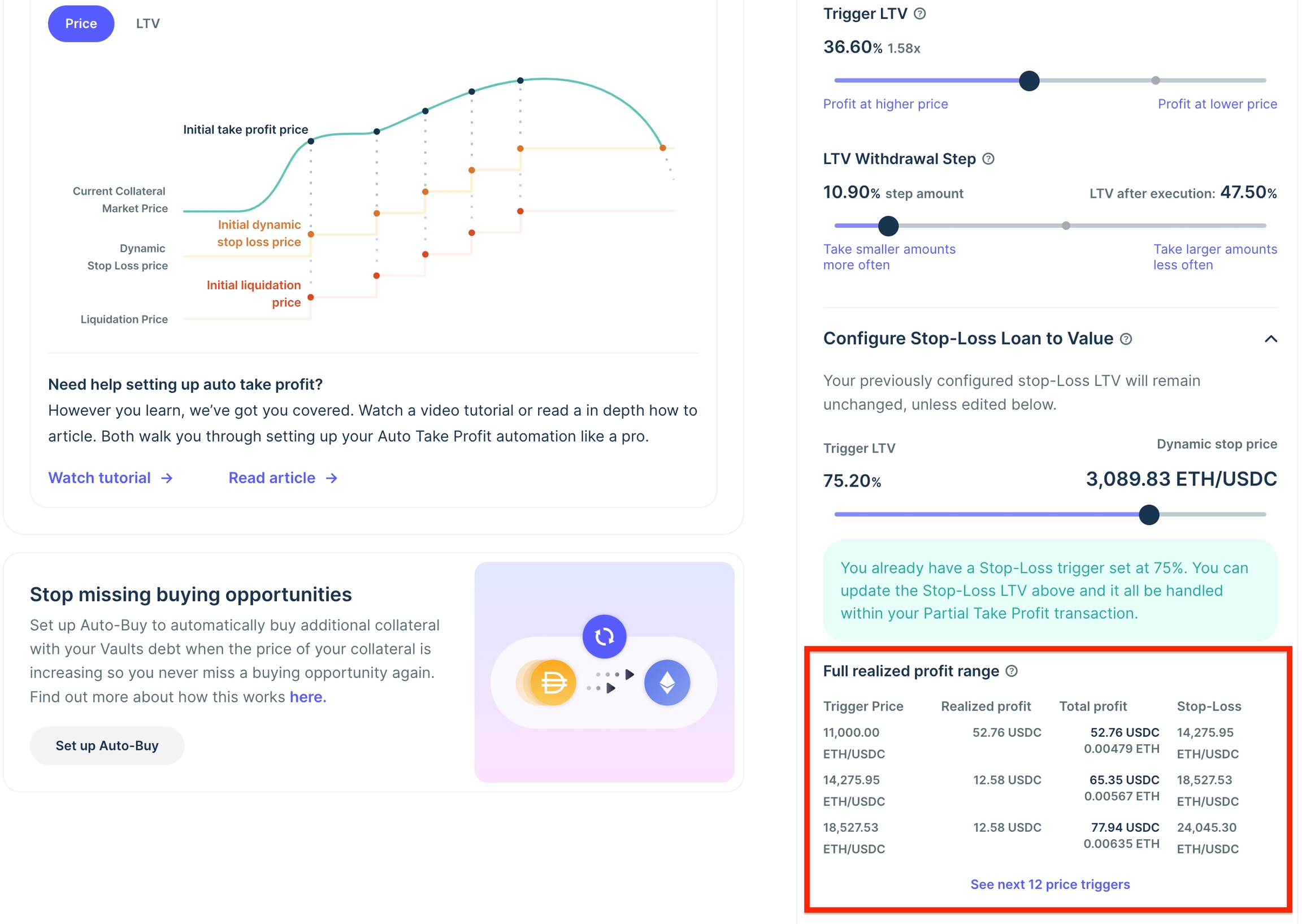
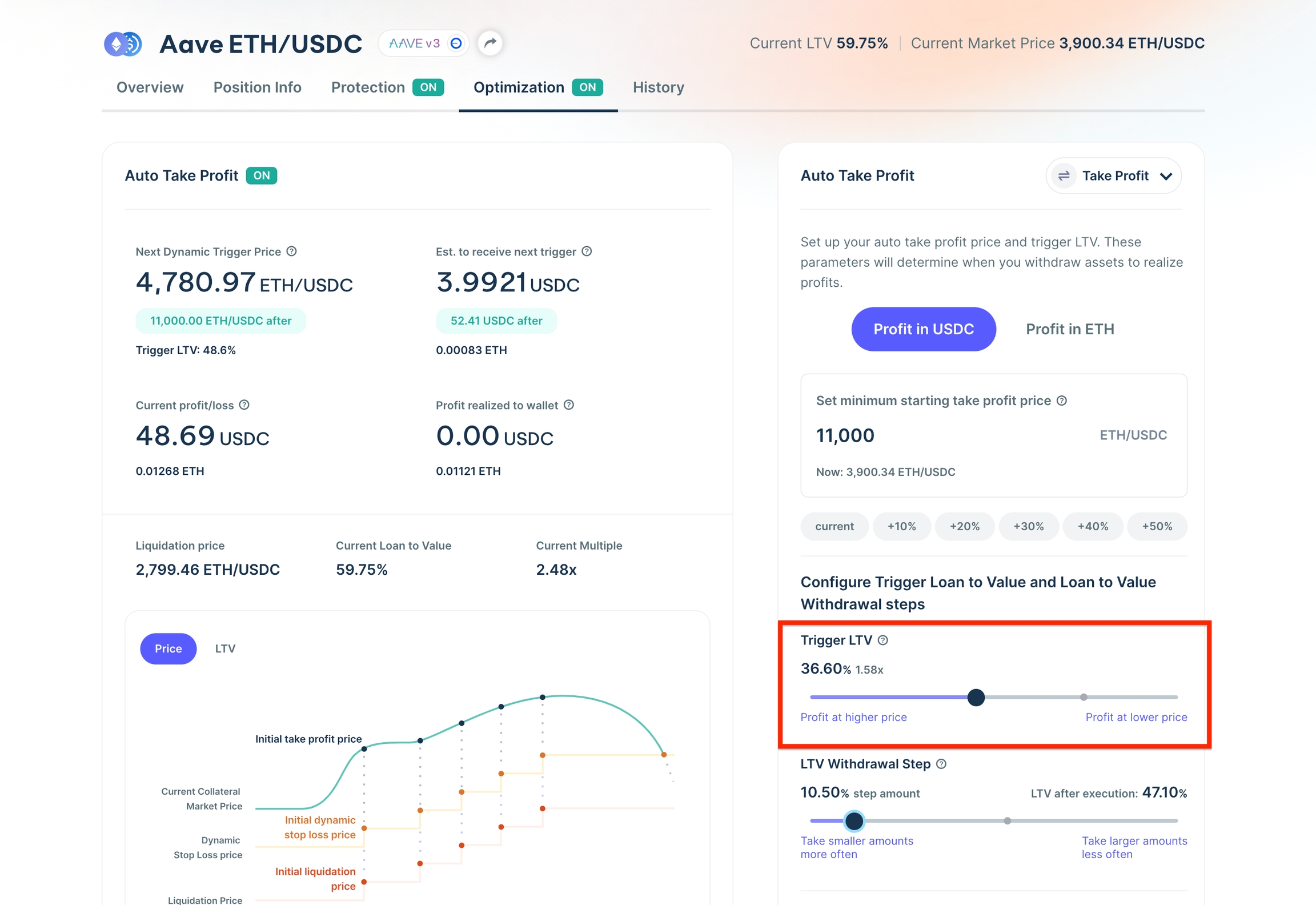
Auto Take Profit
Auto Take Profit its available for Aave v3 on all networks, and Spark on Mainnet.
Why should I use Auto Take Profit over realizing profits manually?
Auto Take profit automation is much more hands off than realizing profits manually. The main benefit is that you can make your decisions about at what price and how much profit you want to realize well before it happens, and the automation will do it for you!
This is in stark contrast to the experience of having to constantly monitor the market, connect your wallet and sign transactions, and thats assuming you are close to your set up!
How does Auto Take Profit work?
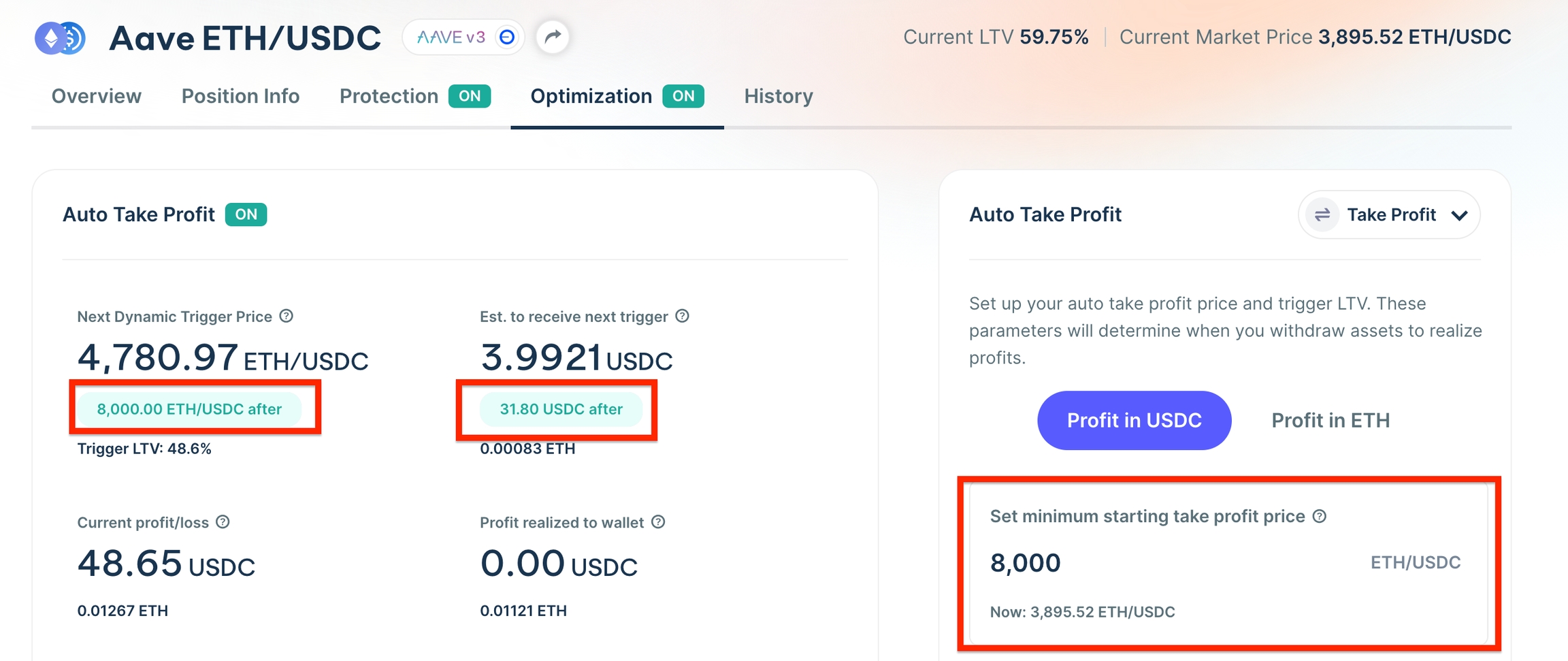
Auto Take Profit works by monitoring the market price of your positions collateral relative to your *Minimum Realize Profit Starting Price (*the price you set to begin realizing profits) and it’s relative LTV.
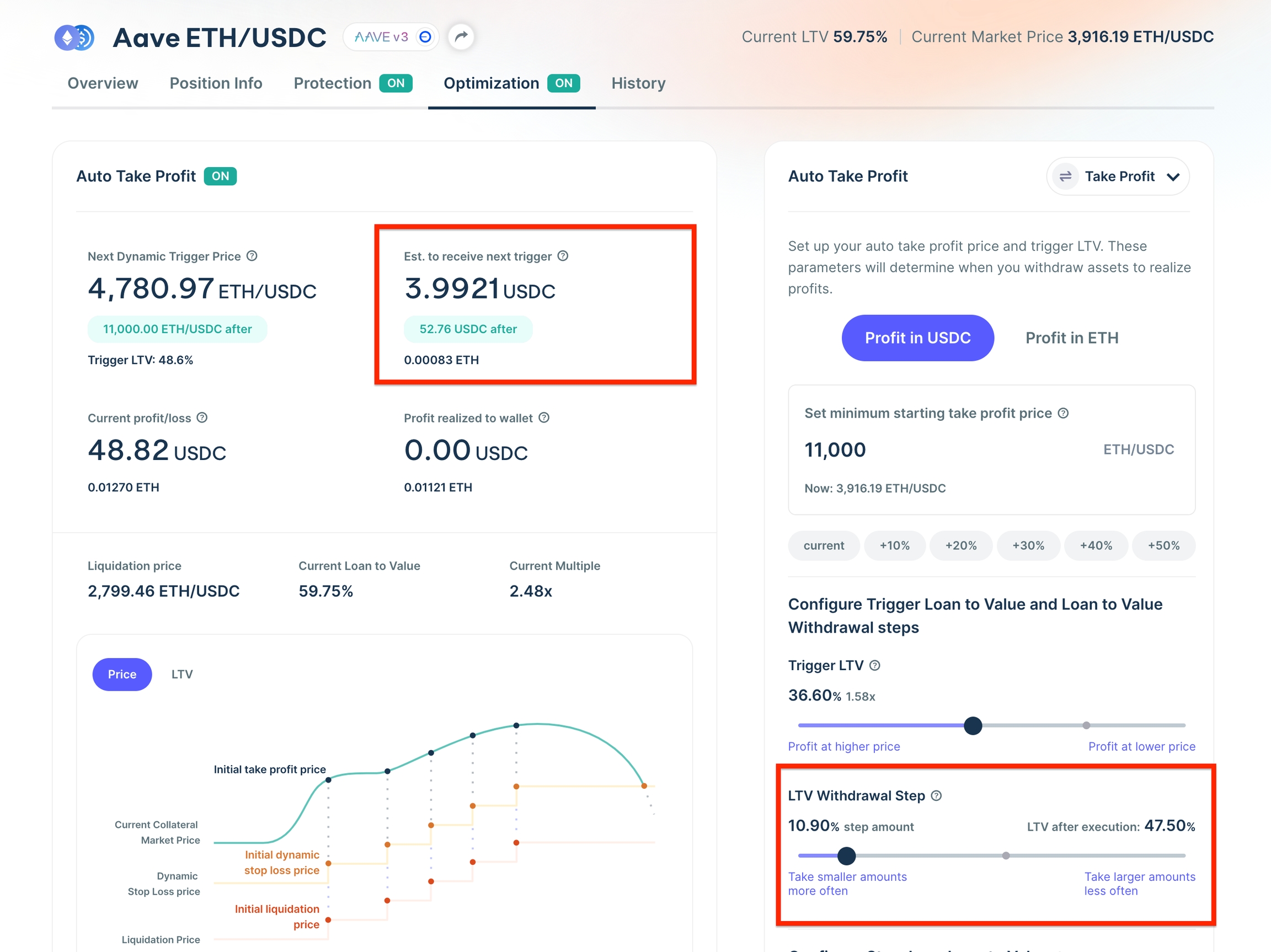
Once that price or LTV is reached, our Smart Contract Automation executes a trigger and withdraws collateral from your vault and sends either the collateral or debt token to your wallet. The amount of which is determined by the Withdrawal Step you set, which is defaulted to 5%, but customizable.
After the starting LTV is triggered, your position will realize profits based on your Trigger LTV, while your withdrawal step remains the same. The Same Contract Automation then executes every time the your Trigger LTV is reached.
Why is my starting LTV different than my trigger LTV?
Your starting LTV is different because of your Minimum Realize Profit Starting Price. Giving you the ability to select the price at which you want to begin realizing profits and the customizability of being able set specific continuous auto take profit parameters that are not anchored to your original Minimum Realize Profit Starting Price requires the use of a second, continuous Trigger LTV.
Am I selling collateral when I take profit?
That’s up to you! Auto Take Profit automation gives you the choice to receive collateral or debt to your wallet upon a trigger. If you choose to receive collateral, there will be no selling. If you choose to receive the debt token (eg. USDC), your withdrawn collateral will be sold for the debt token.
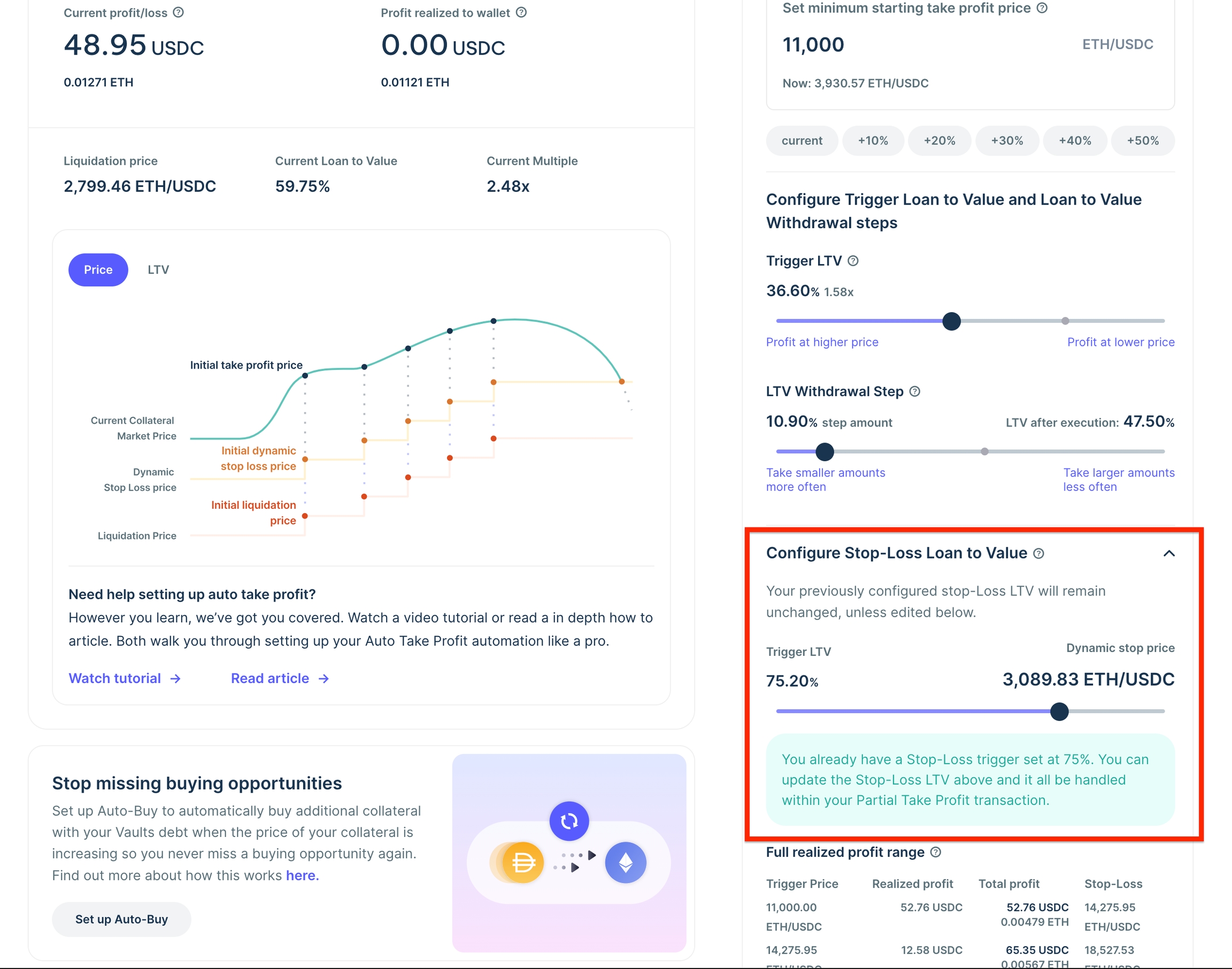
Why do I have to have a Stop Loss or Trailing Stop Loss enabled to use auto take profit?
Using Auto Take Profit means that every time you realize profits, your position LTV will increase along side your Liquidation price. Mandatory Stop Loss or Trailing Stop Loss allows you to get the best of both worlds. Realize Profits when the price is going up, and protect your downside when the price is going down.
What are the risks associated with automation?
The main risks associated with automation are:
Failure to execute: In the case of Auto Take Profit, one of the risks is that the automation fails to execute. Leaving your positions profits at risk of not being realized.
In here you can find all smart contract addresses and documentation related to Summer.fi.
Summer.fi's code is fully open-source, giving everyone in the community the ability to pressure test and audit the core technology. We built on top of heavily audited and long standing lending protocols.
This page provides all relevant links and documentation as a reference. If you think you have found a bug or security issue you can report it on immunefi: https://immunefi.com/bounty/summerfi/ and your report will be treated with the highest priority.
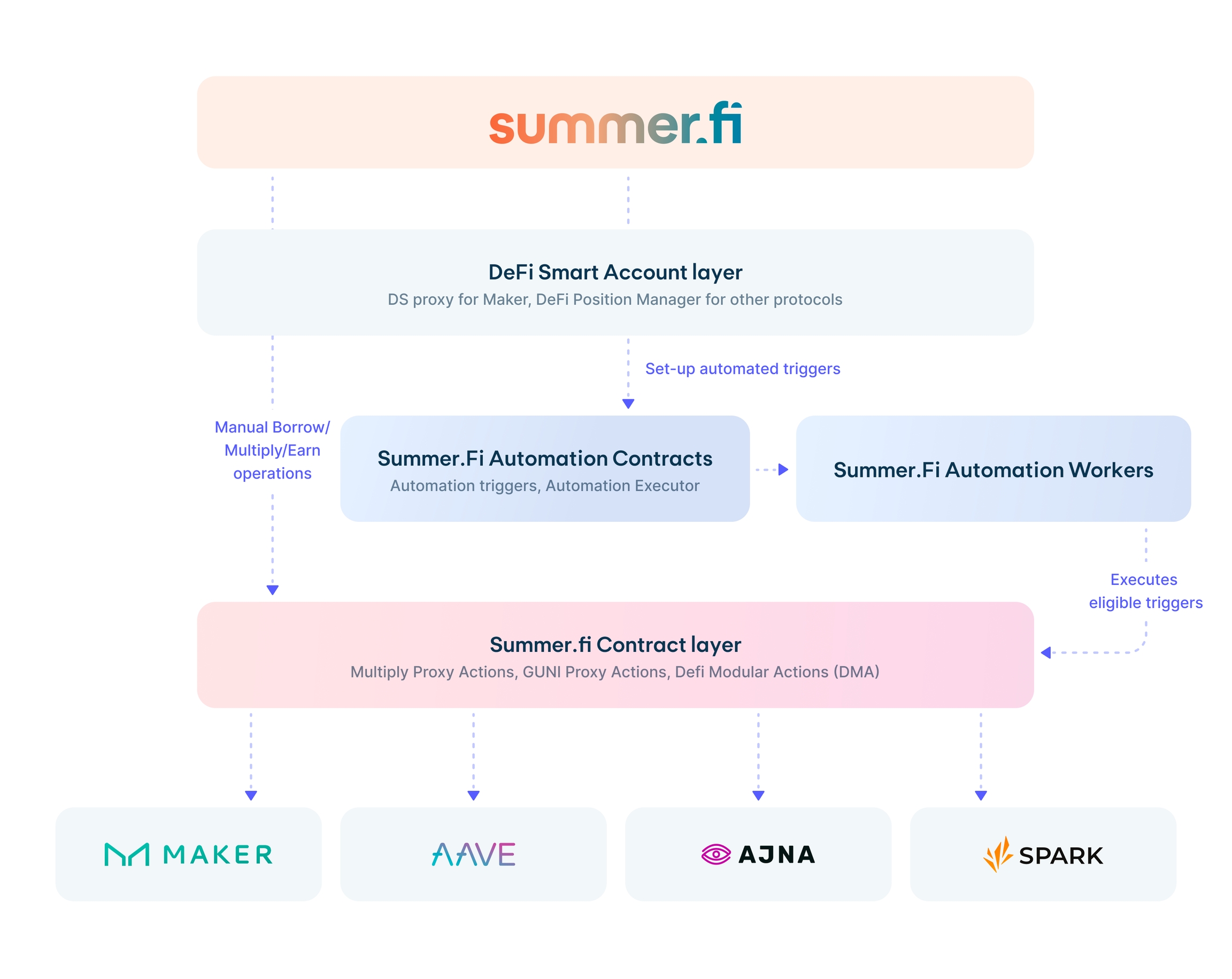
High level Summer.fi Architecture
The architecture of Summer.fi consists of 5 layers:
Summer.fi webapp - https://summer.fi/
This is where the magic happens. Here you view & interact with your DeFi positions.
If you wan to automate your position with a stop loss or other trigger, then those will be recorded in the automation trigger contracts, which get executed only when eligible by the Automation workers.
The Defi protocols themselves, that Summer.fi users interact with through the above layers.
Summer.fi High level Architecture
High level, this is how these layers fit together.
Summer.fi Smart contracts & audits
All smart contracts that you can interact with through Summer.fi can be found on our Immunefi Bug bounty program here: https://immunefi.com/bounty/summerfi/ including audits.
We follow the best security practices and regularly conduct smart contract and code audits. In addition, Summer code is open-source, allowing everyone in the community to pressure test and audit the core technology. You can check our documentation page, which links to our codebase, smart contracts addresses, and code and audit reports.
Can Summer.fi access the funds in my account or wallet?
No. You - and only you - have access and control over your funds. Cryptocurrencies use blockchain technology to ensure the highest level of trust and transparency. Because of the way blockchain technology works, you ultimately get to decide just how secure you want it to be. This does mean you are your security ultimately, so it is very important you keep access to your funds and Summer.fi account secure.
A Trailing Stop Loss is an automated order to protect gains and limit losses. It sets a stop order at a specific percentage or dollar amount away from an asset's market price. As the asset price increases, the stop order trails along, moving up. Conversely, if the price decreases, the stop order remains stationary. This ensures that the position remains open if the price moves in the user's favour, automatically closing if the market changes direction by the set percentage or amount.
Trailing Stop-Loss
Essentially, a Trailing Stop Loss locks in profits while mitigating potential losses, providing an important risk management tool for investors.
Setting up a Trailing Stop-Loss
You only choose a trailing distance
Example: For ETH/USDC this could be 100 ETH/USDC
This distance determines the starting trailing stop price which is:
Current market price - Trailing distance
Example:
Current market price is 2000 ETH/USDC
Trailing distance is 100 ETH/USDC
Current Trailing stop loss price is therefore at 1900 ETH/USDC
Changes in the Trailing Stop Price
If the market price increases to higher than the market price when you initially set-up your trailing stop loss, then the price at which your trailing stop loss will be executed is also increasing. However, when the price then decreases, your trailing stop will stay as it was, based on the highest price.
For example:
Day 1: set-up:
Current market price is 2000 ETH/USDC
Trailing distance is 100 ETH/USDC
Current Trailing stop loss price is therefore at 1900 ETH/USDC
Day 2: price increase:
Highest reached market price is 2200 ETH/USDC
Current Trailing stop loss price is therefore increased to 2100 ETH/USDC
Day 3: price decrease:
Lowest reached market price is 2150 ETH/USDC
As this is higher than the trailing stop price, it stays at 2100 ETH/USDC
Day 4: price increase:
Highest reached market price is 2300 ETH/USDC
Current Trailing stop loss price is therefore increased to 2200 ETH/USDC
Day 5: price decrease:
Current market price reaches below 2200 ETH/USDC
Your trailing stop loss gets executed as a market sell order.
If between signing and submitting the Trailing Stop Loss set-up transaction and execution and inclusion of it happens a Chainlink price update of one of the tokens in your pair, then your set-up/update transaction will revert. This is a protection to ensure that trailing stop loss is fully non-custodial.
How to setup Auto Take Profit
Step by Step Tutorial
Auto Take Profit is an automation designed to help you automate your exit strategy, at your own pace. That means that you can simply set a price at which you want to start to realize some profits then let the automation take over after it has been hit.
Follow these series of steps to set it up with success:
Step 1 - Assess your position and think about your market out look
Before navigating to Auto Take Profit, you’ll want to take a look at your position and familiarize yourself with your key metrics.
Liquidation Price
Current LTV
Stop Loss LTV
Step 2 - Navigate to the optimzation tab from your open position
Once you have that foundation, simply click on the “Optimization tab” of your position and select the “Auto Take Profit” card.
Step 3 - Determine how you’d like to realize profits
The first decision you need to make is a simple one: Do you want to realize profits to collateral or debt?
If you realize profits to collateral, you will simply be withdrawing collateral to your wallet automatically.
If you realize profits to debt, you will be withdrawing collateral and swapping it for the debt asset, which you will receive in your wallet, automatically.
Step 4 - Set your minimum starting take profit price
After you decide if you’d like to realize profits to collateral or debt, you will need to decide when you’d like to start realizing profits.
A simple question to help with this is the simple question of:
At what price in the future would I want to start realizing some profits from my position?
To do this, type the price into the input box on the right hand side. In the example, it is 8,000 ETH/USD but you can input any price above the current price.
After you input the price, on the left hand side of the screen you will be able to see two key Auto Take Profit forecast metrics.
Your Next Dynamic Trigger Price: Reflects the next price at which you will realize profits.
Est. to receive next trigger: Forecasts how much profit you will receive denominated in either collateral or debt.
It is really important to note that this price is Dynamic because it can go up if you make changes to your position after setting it up.
So, if you always want it to be the same, you will need to monitor how it changes after making significant position changes.
Step 5 - Configure your Trigger LTV for continual profit taking
After you have set your minimum starting take profit price, you will need to set a Trigger LTV. This is the constant LTV that will determine when you realize profits after your minimum starting take profit price has been reached.
A simple question to help you think about this is: At what LTV or Multiple will I want to consistently realize profits in the future?
Step 6 - Configure profit size with withdrawal step
After you have set up your minimum starting take profit price, and your LTV trigger, you will need set up your Withdrawal Step.
Your withdrawal step is percentage amount that your LTV will increase after either your minimum take profit price, or trigger LTV. The higher the percentage, the more profits you will realize, the lower the percentage the lesser profits you will realize.
The default for your withdrawal step is 5% but can be customized by you. You can also play with the slider and monitor how much more or less profit you will realize by looking at the Est. to receive next trigger on the left hand side.
Step 7 - Configure or double check your Stop Loss LTV
The last configuration step is for your Stop Loss LTV.
If you already have a s top loss LTV, it will remain the same by default. If you do not have a Stop Loss set up, you will have to set one up in order to use Auto Take Profit.
The simple question that you can ask yourself to help think about it is
At what LTV and its relative price, would I want to be completely out of this market?
Note: Trailing Stop-Loss is also compatible.
Step 8 - Double check your realized profit range
Now that you’ve configured your:
Minimum Starting take profit price - The price at which you will start to realize profits
Trigger LTV - The continuous LTV level that at you will begin to realize profits
Withdrawal step - The distance between your trigger LTV and LTV after execution that determines your amount of profit realized.
Stop Loss LTV - The LTV that once reached your position will be closed.
You will want to double check everything, and make sure that your configurations line up with your expected results in the future. You can do that easily with the Full realized profit range. Within it you can see up to 15 rows of projection for your Trigger Price, Realized Profit, Total Profit and Stop Loss.
Step 9 - Confirm Auto Take Profit with a single transaction
The final step is to click “Confirm” and sign a transaction to solidify the setup of your Auto Take Profit Automation.
Interactive Tutorial
Aave v3 stETH
Earn with stETH yield multiple E-mode
StETH/ETH AAVE yield multiple e-mode is an Earn strategy that allows you to increase the yield received from StETH by increasing your exposure to it by borrowing ETH.
StETH is a token that represents 1 to 1 ETH staked in the beacon chain, it’s the most used liquid staking derivative in the market. Made by Lido it helps users stake their ETH while leaving the hard part for Lido node operators and retaining liquidity.
StETH is a tradable token that can be integrated with DeFi enabling users to do much more on their stake. AAVE, one of the prime lending protocols, integrated wrapped StETH as collateral and one powerful strategy that we are now offering on Earn has appeared: multiplying the StETH yield. With the release of AAVE v3 and the efficiency mode(E-mode) you can multiply the yield of stETH up to x10 times.
How does it work?
Upon opening a position, a flash loan for Dai is taken from Maker and deposited into the Aave V3 Protocol. Then ETH is borrowed until it reaches the desired multiple level. Next, the loaned ETH as well as the user’s initial deposit is exchanged to StETH via 1Inch. Following this process, the total StETH, minus fee, is deposited back into the Aave V3 Protocol where it then reaches its final position. Finally, the borrowed Dai is withdrawn from Aave and paid back to Maker and the Free Flash Loan is settled.
The process to exit these positions is quite similar, however users will now need to sell the StETH from the trade to pay back the ETH loan before withdrawing the remainder.
Where does the yield come from?
The return comes first from the ETH staking yield provided by StETH. That yield is multiplied by increasing exposure to StETH by borrowing ETH. An ongoing cost of the variable ETH borrowing rate in AAVE must be continually paid. This means that the strategy remains profitable as long as the borrowing cost of ETH is lower than the returns from StETH.
This Earn position uses 3 protocols and the power of Summer.fi smart contracts: All capital is deposited to AAVE v3 protocol and held there for the strategy to work. StETH represents ETH held by Lido, which in turn gives it to the node operators that perform the validator duties for Lido.
Benefits of AAVE v3
With the release of AAVE v3, users get access to E-mode. This functionality allows users to go up to 10x multiple on the stETH yield and get increased returns beyond what is possible in AAVE v2. This also has a lower penalty risk for users at 1% vs 5% in AAVE v2.
How much does this cost?
The Summer.fi fee is 0.07% of the amount swapped to close or decrease the risk down in your position. The fee is waived on setup; you can start earning as soon as you start. This strategy pays interest on the ETH borrowed from AAVE. This variable fee is accounted for in the net APY, but it changes continually as the market demands more or less ETH. Users must consider gas costs related to the Ethereum network, which vary with congestion and ETH price.
What are the risks?
Liquidation risk: If the price of stETH measured in ETH decreases, the position will be at risk of liquidation. This could happen for multiple reasons, for example, users selling their StETH for ETH to pursue other strategies, perceived or realized Lido execution risk, and lower general liquidity. The position will be liquidated if the price goes below the liquidation ratio. To understand more about the pricing of stETH in relation to ETH, you can read more in our blog. The liquidation penalty for AAVE v3 E-mode is 1% vs 5% for AAVE V2.
Lower than expected returns: The strategy assumes that the returns from ETH staking minus the Lido fee will be higher than the cost of borrowing ETH in AAVE, allowing users to multiply this exposure. This assumption might not hold in all circumstances, and you should monitor the position to measure the profitability and desired risk. This is shown in the app, allowing you to follow the health of your position.
Governance Risk: As AAVE is a DAO, its governance is in charge of adjusting the parameters. We will communicate the major changes, but if you want to be more informed, check AAVE Forum periodically to be updated on the decisions involving risk parameters for the assets. A proposal takes a total of 7 days to come online, which gives you time to adjust your position in case the change negatively affects your Earn strategy
Oracle Risk: Lending protocols like Aave rely on price oracles that convey asset prices external to the blockchain to the protocol. These are used for marking the value of outstanding loans and estimating which ones are in default. Manipulation of oracle price feeds or errors in reported prices can force the protocol to liquidate loans that are not in default, causing a loss of customer funds.
Systemic risk: Smart contract bugs, and fatal errors in any of the protocols being used such as AAVE, LIDO, and Summer.fi.
Read more about
Read more
Read mode about Lido
Swap and Bridge
Learn how to swap and bridge without leaving Summer.fi
Introduction
A decentralized exchange (DEX) is a type of exchange where transactions occur between the user and a smart contract, without any intermediary party. Among other things, DEXes allows users to trade or swap their assets, become liquidity providers and earn incentives for it.
Currently, one of the biggest and most important aggregators of DEXs is Li.Fi. Thanks to Summer.fi integration with LiFi widget, now you can use their services without leaving our site.
What can I use this feature for?
Swap:
You are managing your vaults, and you notice the collateralization ratio of one of them is too low. You want to repay part of your debt but have no DAI, only USDC. You can use the widget to swap your USDC for DAI, and save your vault from liquidation.
You want to open a new WBTC-A Multiply Vault but only have ETH in your wallet. You can use the widget to swap part of your ETH to WBTC to open your vault.
How to use it?
In the top navigation bar of Summer.fi, you can find a double arrow icon between the “My Positions” icon and the wallet address. When clicked, you will see a popup dialogue similar to the one shown in Figure 1.
There are three things you can do in this dialogue:
Select the asset you want to swap from: You should already have this asset in your connected wallet.
Select the asset you want to swap to: If the swap succeeds, you will receive this asset in your wallet.
Insert the amount of the asset you want to swap.
Once all values are set, the widget will show the current value of your assets in USD, and it will also estimate how much of the other asset you will receive.
If the asset you’re trying to swap is a token, you must allow the contract to spend your tokens. Once the allowance is set, you can click on the “Review swap” button, and a final screen will show the operation summary.
If you agree with the trade, you can click “Start Swap”, and in a few seconds you should see your updated wallet balance with the new asset.
You can watch the whole process in the video below:
Please remember that this is an Ethereum Mainnet transaction, so gas costs will be associated with the swap. You will need ether in your wallet to pay these gas costs.
Advanced settings
You can control additional options for your swap:
Maximum slippage: This allows you to control the maximum price difference you will accept when the swap is completed. If for some reason (lack of liquidity in the contract, size of the swap, or others) the difference is bigger than this setting, the transaction will revert.
You can access this configuration screen by clicking on the gear icon at the top right of the popup widget.
Are there any additional costs?
There is a convenience fee of 0.20% for this feature.
Bridge:
Here's a video tutorial on using Li.Fis bridging feature:
We have curated the bridging experience to bridge between Mainnet and L2's, where Summer.fi will be available soon. You can choose to receive a different asset on the target chain. Click on "Review Swap" and you will see the route and the costs associated with this transaction. If you're happy with the result, click "Start swap" and confirm the transaction in your wallet.
Learn how Summer.fi deals with address compliance check (including Tornado Cash)
To allow global access to our hosted front-end, Summer.fi needs to comply with the latest rules, regulations and sanctions from multiple jurisdictions. We have teamed up with a compliance vendor to ensure our hosted front-end is not used with funds associated with wallets potentially dealing in ransomware, malware, child sex abuse material, known criminals, and sanctions lists published by the global community.
When a user connects to Summer.fi, the address is checked for this compliance against our compliance vendor. If this automated check finds that a user should be restricted, they are disconnected from the app.
If you have been blocked and believe this is done by mistake, please email [email protected] and someone from the team will be able to help you and discuss possible options.
Reminder: Summer.fi does not have the ability to control its users' funds anyhow. The underlying protocols are completely decentralized and all customers that use it, will always maintain custody of their funds.
Frequently Asked Questions
I used Tornado Cash prior to the sanctions being announced, will I be blocked?
No, any addresses that have usage of Tornado Cash prior the sanctions came into action will not be blocked on that basis.
We are using Summer.fi and want to ensure we can’t be blocked by the actions of others trying to lock us out of our account, can you ensure this?
If you are using your wallet legitimately, and want to ensure access to Summer.fi in the future, please contact [email protected] who can discuss the circumstances and possible options.
If I have been blocked on one address, can I still use Summer.fi using another address?
Yes, each address is treated individually, so if you urgently need to repay debt or add additional collateral, you can connect with another wallet and perform the relevant actions from this wallet.
Automated Stop-Loss is a product offered by Summer.fi that allows you to prevent liquidations on your Vaults if the collateralization ratio falls too low.
Stop-Loss protection is currently available for Maker, Aave v3, and Spark positions.
What happens once Stop-Loss has been triggered?
Automated Stop-Loss is a product offered by Summer.fi that allows you to prevent liquidations on your Vaults if the collateralization ratio falls too low.
You can set the minimum collateralization ratio you're willing to accept on your Vault, and if your Vault's ratio is at or below this level, a Stop-Loss action is triggered. You can configure this action to close your Vault to collateral or to Dai, therefore preventing further losses if the collateral price goes down.
Once you configure the minimum collateralization ratio and the asset to be received when the protection is triggered, you will need to send a transaction to allow the automation smart contracts to interact with your Vault, and to enable the feature with the selected parameters.
From then on, Keepers (incentivized automated or human actors) start monitoring the next OSM price and your vault's parameters. If the Stop-Loss condition is met for the next price oracle update, any Keeper can execute the trigger function in the automation contracts and call the "Close Vault" action on the Vault.
These transactions are sent to a Flashbots node to prevent any front-running.
The flow diagram in the figure shows the sequence of events when the protection is triggered.
Figure 1: Stop-Loss protection flow chart
What are the risks associated with Stop-Loss protection?
Automated Stop-Loss protection is a tool that depends on certain conditions to work correctly. Some risks may make the protection fail or work differently than expected. You, as the user of the feature, should be aware of these risks:
Keepers are centralized: Keepers are the actors that react to OSM price variations and start the vault closing process by sending a transaction to the network. If for any reason, the Keepers fail, or are unable to send the transactions, your Automated Stop-Loss might not work as expected.
Gas costs can spike: In moments of high volatility, there are usually a high amount of transactions waiting to be mined. This congests the network, and the gas price needed for a transaction to be processed in the next block increases. If a Keeper sends a transaction with low gas price, it might be queued for some time until it is finally mined.
The exchange might face liquidity issues: To unlock your collateral in the event of protection triggering, the Automation Smart Contracts take a flash loan to cover your vault’s debt, and then swap part of your unlocked collateral to pay the flash loan back. These actions are routed through a decentralized exchange that might temporarily have liquidity issues for the loan or the swap. In these cases, the transaction can be more expensive than the predicted value, or fail completely.
The price oracle can fail: Maker OSM module delays the propagation of the collateral’s next price for one hour. This means that if a malicious actor tries to manipulate the next price, there is time to react to the attack and revert to a valid value. If, during an attack, the Keepers take the incorrect value as truth, they might be tricked into triggering the stop loss protection incorrectly, or not triggering it at all.
Smart Contracts related to the Automated Stop-loss protection could be paused: in case an issue is found, Summer.fi does have the power to disable the Automaton-related Smart Contracts. Please note that this would not impact your ability to manually redeem collateral or adjust your vault.
Why can't I set a target price instead of a collateralization ratio?
Automated Stop-Loss applies to Vaults that can be adjusted anytime and accrue stability fees over time. Setting a target liquidation price means that it must be reconfigured every time you adjust your vault’s collateral and debt.
To prevent this, you set your target collateralization ratio independent of the current vault's debt or multiple factors and not affected by the stability fees.
Are there any fees or costs associated with the Automated Stop-Loss feature?
There are no recurring or additional costs associated with protecting your Vault, compared to a non-protected Multiply Vault. As with any other Ethereum transaction, a gas cost is associated with the vault being closed and the Stop-Loss being triggered.
The stop-loss trigger is performed by Keepers, externally owned accounts (EOA) not associated with the Vault's owner. The gas costs incurred by these actors is reimbursed, and paid from the Vault's funds (either collateral or Dai).When you configure your Vault’s Stop-Loss protection, you can see a detail of all fees charged to the vault closing transaction.
Once the protection is set up, you can see at any time the approximate amount of assets you will receive when the Stop-Loss protection is triggered. This value takes into account all fees and costs.
How can I disable or adjust the Stop-Loss protection parameters?
You can access the Automated Stop-Loss configuration by clicking in the "Protection" tab in your vault's page.
Figure 1: Vault Protection Overview
In that page you can modify the Stop-Loss Collateralization Ratio, the asset received, or you can disable all protections completely by clicking on the "Cancel downside protection" button.
Any modifications to the state of the Automated Stop-Loss or its parameters will require you to send a transaction, and will incur in gas costs.
What price is used to trigger and calculate my Stop-Loss?
There are two collateral prices involved in a Stop-Loss trigger.
The collateral price used for the trigger itself, shown in the Vault protection page as the Dynamic Stop Price, is compared to the next price for the collateral as informed by Maker OSM. If the next price of the collateral is below the Dynamic Stop price, the Stop-Loss protection is triggered.
If your choice is to close your position to Dai, the collateral price used to calculate the Dai sent to your wallet when the protection is triggered is the market price of the collateral in the moment of the Stop-Loss protection. The swap from your collateral to Dai is routed through 1inch decentralized exchange.
How much of my assets will I get back if the Stop-Loss protection is triggered?
You can see an approximate amount of assets you will receive on stop loss trigger in the box shown in Figure 1
Figure 1: Estimated amount of assets to receive when the protection is triggered
It is very difficult to calculate the exact amount as it depends on several factors at the time of the Stop-Loss trigger. These factors include market price, available liquidity and gas costs. The calculation shown assumes a 2% difference from Trigger Price to Market Price.
The amount saved compared to liquidation is based on the assumption of not paying a Liquidation Penalty, currently set to 13.00%.
$RAYS
$RAYS is the new points system within Summer.fi
The Summer.fi $RAYS Campaign is in preparation for the launch of the Summer.fi Earn Protocol, coming in early 2025.
Eligibility Criteria for Retroactive Points Allocation
Level 1: Active Wallet
Requirement: You must have a non-custodial wallet with at least 0.2 ETH on Mainnet, ARB, OP, or Base and at least 5 transactions.
Reward: 100 $RAYS
Condition: You must open a position with a net value of at least $500 and keep it open for at least 14 days.
Level 2: DeFi User
Requirement: Have a currently active position on May 31st on a supported protocol and network.
Reward: 200 $RAYS per protocol.
Condition: Need to open a position of at least $500 net value and keep it open for at least 14 days.
Level 3: Summer.fi User
Requirement: Performed a transaction on Summer.fi since June 2021.
Reward: 500 $RAYS per protocol, tripled if an active user at the snapshot.
Level 4: Summer.fi Power User
Requirement: Performed a Multiply or Yield Loop Transaction, used migrate or refinance, or enabled automation.
Reward: 2,000 $RAYS for each unique feature used, tripled if an active user.
Retroactive Points Allocation
Continuous Accruing Points
Open any position to get $RAYS:
Borrow: Unlock liquidity from your crypto assets.
Earn: Compound your crypto capital using high-quality DeFi protocols.
Multiply: Amplify your exposure and profits conveniently.
$RAYS Points Calculation: Earned per $ managed per second, approx. 690 $RAYS per $10k per year, capped at $10M.
Boost your rank on the leaderboard with multipliers:
Automation Multiplier: 1.1x for stop-loss, 1.5x for other automations.
Time Bonus:
1.2x for >30 days
1.5x for >90 days
2x for >180 days
Additional: If the position was held before the snapshot, receive an extra 0.5x for positions older than 30 days, 1.15x for positions older than 90 days, and 1.3x for positions older than 180 days.
Protocol Bonus:
1.2x when active on 2 protocols
1.5x for 3 protocols
2x for 4 protocols
3x for 5+ protocols
Special Activities:
Multiply/Yield Loop Trades:
Uncorrelated pair: Earn 20% of the yearly points allocation of the swap size.
Correlated pair: Earn 6% of the yearly points allocation of the swap size.
Multiples:
1.5x for 6-10 trades
2x for 11-25 trades
5x for 25+ trades
Migrate/Import a Position: Earn 20% of a year's worth of points instantly for importing or migrating a position into Summer.fi (must keep the position for at least 30 days or points will be lost).
Refer Another User: Earn 5% of all the $RAYS they earn for 12 months post-referral.
Continuos Accruing Points
Boost your $RAYS earnings with multipliers for automated positions
Automatically Protect Your Position:
Stop Loss: 1.1x - Closes your positions if market turns downward.
Trailing Stop Loss: 1.5x - Adjusts the stop loss automatically to secure profits.
Auto Sell: 1.5x - Executes a sell to reduce risk or lock in profits automatically.
Automatically Capture Market Moves:
Auto Buy: 1.5x - Purchases assets when market momentum is favorable.
Auto Take Profit: 1.5x - Sells assets at predefined targets to realize profits.
Additional Multipliers:
Time Bonus:
1.2x for >30 days
1.5x for >90 days
2x for >180 days
Additional bonuses for positions held before the snapshot (1.05x to 1.3x, depending on duration).
At any time, you can use Summer.fi to convert your sDAI into DAI at the current exchange rate. Converting sDAI to DAI incurs no additional costs and no slippage as it is deposited or withdrawn from the DSR contract.